Overview
The Thrive PayPal Product API is a partner middleware: your consumer (plugin, SaaS, CLI) talks to it, and it talks to PayPal on the merchant's behalf. Your code never holds PayPal partner credentials and never calls PayPal's REST API directly.
The Product API is currently pointed at PayPal Sandbox. When you onboard, a real PayPal sandbox merchant account is connected; real PayPal sandbox redirects and webhooks fire. The integration steps and code you write here will not change when we flip to live PayPal - only the server-side env vars do.
┌──────────────┐        ┌──────────────────────────────────────────┐        ┌──────────────────┐
│ Your plugin  │──HTTP─►│ Thrive PayPal API                        │──HTTP─►│ PayPal Sandbox   │
│ (WP / Node / │        │ https://tpa.stagingthrivethemes.com/api/ │        │ api.sandbox.     │
│  anything)   │◄──JSON─│ paypal/v1                                │◄──JSON─│ paypal.com       │
└──────────────┘        └──────────────────────────────────────────┘        └──────────────────┘
A note on response shapes
This guide shows the minimum shape of each response - the fields you'll usually need. PayPal returns many additional
documented fields (e.g. seller_receivable_breakdown on captures, oauth_integrations on merchant info,
seller_payable_breakdown on refunds, varying capability sets per account). Code defensively: don't assume the
response is exhaustive, and don't crash on unexpected fields.
Field-level provenance for each fixture is documented in tests/fixtures/paypal/README.md (internal). Fixtures are captured from real PayPal sandbox responses and refreshed when the contract drifts.
- LIVE
/onboarding/completenow verifies the submittedsecret↔merchant_idbinding with PayPal and returns422(changing nothing) on mismatch - no request change. See Step 3. - LIVE
POST /subscriptions/{id}/activatenow returns502(instead of a silent200 / vault_id:null) when PayPal's capture returns no vault token - treat as a failed activation. See Activate. - LIVE
Two newly-forwarded webhook event types:
PAYMENT.CAPTURE.PENDINGandCHECKOUT.ORDER.APPROVED. The partner webhook was re-registered with PayPal, so both are now registered and delivered (live on staging as of 2026-06-17). See the Webhook event catalog. - LIVE
MERCHANT.ONBOARDING.COMPLETEDis a subscribed event - the Product API receives it (live on staging as of 2026-06-17). - LIVE
The fresh-onboarding completion path is built + live on staging (commit
a514113, e2e-validated 2026-06-17):/onboarding/completereturns a distinct202 pendingwhen PayPal hasn't provisioned the merchant yet, and theMERCHANT.ONBOARDING.COMPLETEDhandler finalizes the connection and nudges your plugin to fetch credentials. Delivery contract = push nudge + plugin fallback retry. See Step 3.
INTERNAL
Renewal-cron hardening (commit de7f11a): the per-period PayPal-Request-Id is now reliably
cleared on a clean first-attempt renewal success (it previously leaked into the next period). This is a
server-side idempotency-key fix only - no request/response or webhook contract change,
no plugin action required - noted here so the documented build matches the current
paypal-ppcp-v2 tip.
Configuration
Define one constant in your plugin (or environment). For WordPress, put it in wp-config.php
ABOVE the require_once ABSPATH . 'wp-settings.php'; line.
WP Config
// wp-config.php
define( 'THRIVE_PAYPAL_API_BASE', 'https://tpa.stagingthrivethemes.com/api/paypal/v1' );

// Optional: lengthen HTTP timeout if the server is slow under load.
define( 'THRIVE_PAYPAL_HTTP_TIMEOUT', 15 );

// Optional: enable verbose logging of API responses to wp-content/debug.log
define( 'THRIVE_PAYPAL_DEBUG', false );
Server-side configuration (for reference - not yours to set)
These are the env vars set on the Product API host. You don't configure them; this is only here so you understand what your traffic is hitting.
PAYPAL_ENV=sandbox
PAYPAL_CLIENT_ID=<Thrive partner sandbox client_id>
PAYPAL_CLIENT_SECRET=<Thrive partner sandbox client_secret>
PAYPAL_PARTNER_MERCHANT_ID=HVEZ66K74VENY
PAYPAL_WEBHOOK_ID=<id returned from paypal:webhooks:register>
PAYPAL_BN_CODE=ThriveThemesPPCP_SPPAYPAL_WEBHOOK_ID above isn't something you pick.
PayPal generates it when you register a webhook subscription. The Product API includes an Artisan command
that does the registration for you:
# Register (one-time per environment)
php artisan paypal:webhooks:register

# List currently-registered hooks
php artisan paypal:webhooks:register --list

# Delete a hook (e.g. before re-registering against a new URL)
php artisan paypal:webhooks:register --delete=WH-XXXXXXXX.env as PAYPAL_WEBHOOK_ID and run
php artisan config:clear. Signature verification on incoming webhooks needs it set.
The 5-step flow at a glance
┌──────────┐   ┌──────────────────┐   ┌─────────────┐   ┌─────────┐
│ Your     │   │ Thrive PayPal    │   │ PayPal      │   │Merchant │
│ plugin   │   │ Product API      │   │ Hosted UI   │   │(buyer's │
│          │   │ /api/paypal/v1   │   │             │   │admin)   │
└────┬─────┘   └────────┬─────────┘   └──────┬──────┘   └────┬────┘
     │ 1. POST /onboarding/start       │               │
     │    { secret, site_url }               │               │
     ├──────────────────►│                   │               │
     │   ◄─ { url }      │                   │               │
     │                   │                   │               │
     │ 2. Redirect merchant to url           │               │
     ├───────────────────┼──────────────────►│               │
     │                   │   merchant signs in + approves    │
     │                   │                   ├──────────────►│
     │ ◄── PayPal redirects merchant back ───┤               │
     │     ?merchantIdInPayPal=XYZ&permissionsGranted=true   │
     │                   │                   │               │
     │ 3. POST /onboarding/complete            │               │
     │    { secret, referral_token, merchant_id, site_url } │
     ├──────────────────►│                   │               │
     │   ◄─ { client_id, sdk_client_token, … }               │
     │                   │                   │               │
     │ 4. POST /auth/token           │               │
     │    Authorization: Basic b64(mid:secret)               │
     ├──────────────────►│                   │               │
     │   ◄─ { access_token, expires_in }     │               │
     │                   │                   │               │
     │ 5. Use Bearer access_token on every subsequent call   │
     │    (orders, vault subs, refunds, webhook config…)     │
Steps 1, 3, 4, 5 are HTTP calls you make. Step 2 happens on PayPal's website - you redirect the merchant there, you don't call any API during it.
A reusable PHP client (drop into your plugin)
Shape this as you like; what matters is that the API surface is well-isolated so you can swap
the underlying transport (WordPress's wp_remote_* vs. Guzzle, etc.) without touching the
business logic.
<?php
namespace YourPlugin\Paypal;

class ThrivePaypalClient {
    private string $base;
    private int    $timeout;

    public function __construct() {
        $this->base    = defined( 'THRIVE_PAYPAL_API_BASE' )
            ? rtrim( THRIVE_PAYPAL_API_BASE, '/' )
            : 'https://tpa.stagingthrivethemes.com/api/paypal/v1';
        $this->timeout = defined( 'THRIVE_PAYPAL_HTTP_TIMEOUT' ) ? (int) THRIVE_PAYPAL_HTTP_TIMEOUT : 10;
    }

    /** Generate a 32-char client-side tracking secret. Store it BEFORE redirecting. */
    public function generateSecret(): string {
        return bin2hex( random_bytes( 16 ) );
    }

    /** POST /onboarding/start -> { url, expires_in } */
    public function partnerReferral( string $secret, string $site_url ): array {
        return $this->request( 'POST', '/onboarding/start', [], [
            'secret'   => $secret,
            'site_url' => $site_url,
        ] );
    }

    /** POST /onboarding/complete -> { client_id, sdk_client_token, ... } */
    public function exchangeCredentials( string $secret, string $referral_token, string $merchant_id, string $site_url, ?string $webhooks_url = null ): array {
        $body = compact( 'secret', 'referral_token', 'merchant_id', 'site_url' );
        if ( $webhooks_url ) $body['webhooks_url'] = $webhooks_url;
        return $this->request( 'POST', '/onboarding/complete', [], $body );
    }

    /** POST /auth/token (Basic auth) -> { access_token, expires_in } */
    public function accessToken( string $merchant_id, string $secret ): array {
        return $this->request( 'POST', '/auth/token', [
            'Authorization' => 'Basic ' . base64_encode( $merchant_id . ':' . $secret ),
        ] );
    }

    /** GET /merchant -> capabilities + payments_receivable */
    public function merchantInfo( string $bearer ): array {
        return $this->request( 'GET', '/merchant', [
            'Authorization' => 'Bearer ' . $bearer,
        ] );
    }

    /** Generic transport. */
    private function request( string $method, string $path, array $headers = [], ?array $body = null ): array {
        $args = [
            'method'  => $method,
            'timeout' => $this->timeout,
            'headers' => array_merge( [ 'Accept' => 'application/json' ], $headers ),
        ];
        if ( $body !== null ) {
            $args['headers']['Content-Type'] = 'application/json';
            $args['body'] = wp_json_encode( $body );
        }
        $resp = wp_remote_request( $this->base . $path, $args );
        if ( is_wp_error( $resp ) ) {
            throw new \RuntimeException( 'HTTP error: ' . $resp->get_error_message() );
        }
        $status = wp_remote_retrieve_response_code( $resp );
        $json   = json_decode( wp_remote_retrieve_body( $resp ), true );
        if ( $status >= 400 ) {
            throw new \RuntimeException( "Thrive PayPal API {$status}: " . ( $json['error'] ?? 'unknown' ) );
        }
        return is_array( $json ) ? $json : [];
    }
}
Notice there are zero mode-specific branches. When we flip from sandbox to live PayPal, only the
THRIVE_PAYPAL_API_BASE changes; your code stays put.
/onboarding/start
Step 1 - Start onboarding
When the merchant clicks "Connect PayPal" in your plugin admin: generate a random 32-char
secret, persist it on the site, then call partner-referral.
// In your plugin's admin action handler
$client = new ThrivePaypalClient();
$secret = $client->generateSecret();
update_option( 'thrive_paypal_secret', $secret );  // persist BEFORE redirecting

$site_url    = home_url();
$webhook_url = home_url( '/wp-json/your-plugin/paypal/webhook' );
update_option( 'thrive_paypal_webhook_url', $webhook_url );

$resp = $client->partnerReferral( $secret, $site_url );
wp_redirect( $resp['url'] );
exit;
curl equivalent
curl -X POST https://tpa.stagingthrivethemes.com/api/paypal/v1/onboarding/start \
  -H 'Content-Type: application/json' \
  -d '{"secret":"a1b2c3d4e5f6g7h8i9j0k1l2m3n4o5p6","site_url":"https://merchant.example"}'
Expected response
{
  "url":        "https://www.sandbox.paypal.com/bizsignup/partner/entry?referralToken=ZWQ...",
  "expires_in": 1783171822    // Unix timestamp after which PayPal rejects the referral
}
url is what you redirect the merchant to. expires_in is the absolute
Unix timestamp after which PayPal will reject the link; in practice this is hours away, but if
the merchant abandons mid-flow and comes back days later, generate a fresh URL.
PayPal hosted UI
Step 2 - Merchant approves on PayPal
No API call from you. The merchant lands on PayPal, signs in, reviews and approves. PayPal
redirects them back to the site_url you supplied in Step 1, with query parameters:
https://merchant.example/?
    merchantId=<your secret echoed back by PayPal as tracking_id>
    &merchantIdInPayPal=HF5SN9RKCTNJ2
    &productIntentId=addipmt
    &isEmailConfirmed=true
    &accountStatus=BUSINESS_ACCOUNT
    &permissionsGranted=true
    &consentStatus=true
    &riskStatus=SUBSCRIBED_WITH_ALL_FEATURES
Key params: merchantIdInPayPal is the real PayPal merchant id you'll use in Step 3.
merchantId is your own secret echoed back (PayPal uses our tracking_id field for it).
permissionsGranted=true + consentStatus=true confirm a clean approval.
Bail with a friendly error if either is missing.
Your plugin must handle this redirect and capture the parameters:
// admin-init hook or wherever you handle PayPal's return
add_action( 'init', function() {
    if ( ! isset( $_GET['merchantIdInPayPal'] ) || ! is_admin() ) return;

    $merchant_id     = sanitize_text_field( $_GET['merchantIdInPayPal'] );
    $permissions_ok  = ( $_GET['permissionsGranted'] ?? '' ) === 'true';
    $referral_token  = sanitize_text_field( $_GET['referral_token'] ?? '' );

    if ( ! $permissions_ok ) {
        // Merchant declined. Show error and bail.
        wp_die( 'PayPal onboarding cancelled. You can retry from the settings page.' );
    }

    // Proceed to Step 3 with these values.
    do_action( 'your_plugin_paypal_complete_onboarding', $merchant_id, $referral_token );
} );/onboarding/complete
Step 3 - Exchange credentials
Combine the secret you stored in Step 1 with the merchant_id + referral_token
from Step 2 to register the merchant in the Product API.
add_action( 'your_plugin_paypal_complete_onboarding', function( $merchant_id, $referral_token ) {
    $client       = new ThrivePaypalClient();
    $secret       = get_option( 'thrive_paypal_secret' );
    $site_url     = home_url();
    $webhooks_url = get_option( 'thrive_paypal_webhook_url' );

    try {
        $creds = $client->exchangeCredentials( $secret, $referral_token, $merchant_id, $site_url, $webhooks_url );
    } catch ( \RuntimeException $e ) {
        // Surface the error to the admin and retain $secret so they can retry.
        wp_die( 'PayPal credentials exchange failed: ' . esc_html( $e->getMessage() ) );
    }

    // Persist the merchant identity + JS SDK creds.
    update_option( 'thrive_paypal_merchant_id',    $merchant_id );
    update_option( 'thrive_paypal_client_id',      $creds['client_id'] );
    update_option( 'thrive_paypal_sdk_token',      $creds['sdk_client_token'] );
    update_option( 'thrive_paypal_sdk_expires',    time() + (int) $creds['sdk_client_token_expires_in'] );
}, 10, 2 );
Expected response
{
  "env":                         "sandbox",                  // or "live"
  "client_id":                   "AXCsMzCO5aAUmaBeRlm_AottTkIZwGhSC4SOXOfdzX-PmU5s_PqiS2fVUDQ5w1XJSjwASQfypFVO0UAI",
  "partner_merchant_id":         "HVEZ66K74VENY",
  "client_token":                "eyJicmFpbnRyZWUiOnsi…",   // nested Braintree+PayPal JWT
  "client_token_expires_in":     3239,                       // ~54 minutes
  "sdk_client_token":            "eyJraWQiOiJjMDg…",         // ES256-signed JWT
  "sdk_client_token_expires_in": 900,                        // 15 minutes
  "country":                     "US",                       // ISO 3166-1 alpha-2; persist at connect (null only if PayPal omits it)
  "webhook_secret":              "b6af202343ec65854cdb34ce753ef483c68bf66dcf5f2813b42ecdf088901339"
}
client_id and sdk_client_token go into your PayPal JS SDK initialization on
merchant checkout pages. Both tokens expire; refresh either via GET /merchant/credentials
(Bearer auth) once you have the access token from Step 4.
webhook_secret field is critical and delivered ONCE here.
It's the 64-character HMAC-SHA256 key your plugin uses to verify the
X-Thrive-Webhook-Signature header on every forwarded webhook. Store it encrypted
on the merchant site immediately - if you lose it, fetch it again via
GET /merchant/credentials. Without it your plugin cannot trust the webhook chain.
env field tells you which PayPal environment this Product API
instance is connected to - "sandbox" on staging, "live" on production.
Cache it alongside the merchant so your admin UI can render a clear "Connected to Sandbox" or
"Connected to Live" badge. The same value also appears on
GET /merchant, so a settings page can refresh it without re-running onboarding.
Server-side identity gate LIVE v1.1
Before it creates or updates the connected-merchant record, the Product API now verifies
with PayPal that the secret you submit is the tracking_id
PayPal bound to the merchant_id you submit. Internally it calls PayPal's
GET /v1/customer/partners/{partner}/merchant-integrations?tracking_id={secret}
and requires the returned merchant_id to equal the one in your request. This
binds secret ↔ merchant_id and blocks an attacker who knows a victim's
(public) merchant_id + site_url from overwriting the record with
their own secret.
422 and changes nothing - no record
is created or updated, and no webhook_secret is returned. Handle
the 422 the same way you handle any other failed credentials exchange: keep the
stored secret, surface the error, and let the merchant retry from settings (the
catch branch in the Step 3 snippet above already does this). On the happy path the
gate is transparent - one extra PayPal round-trip, then the unchanged success response.
No request change. The gate reads only fields you already send
(secret, merchant_id, referral_token,
site_url, webhooks_url), so your onboarding code is unchanged, and
webhook_secret is still returned in the success body exactly as documented above.
Fresh-onboarding eventual consistency
PayPal provisions the merchant-integration record asynchronously when onboarding
completes, so for a brand-new first onboarding the lookup the gate depends on
can briefly 404 in the first seconds after the merchant approves at PayPal - which would
surface as a transient 422.
merchant-integrations
lookup before deciding. This sits entirely server-side on the coldest path (once per connect)
and is invisible to your code - a legit merchant is not forced to redo PayPal approval for a
few seconds of provisioning lag.
/onboarding/complete
now returns a distinct 202 with {"status":"pending"}
(instead of a bare 422) and parks an inert pending record. When PayPal then fires
MERCHANT.ONBOARDING.COMPLETED, the Product API re-verifies the now-consistent binding
(hashSecret(tracking_id) === secret_hash), activates the connection, and forwards
that event to your webhooks_url as a trigger to fetch credentials.
(Live on staging as of 2026-06-17, commit a514113 - e2e-validated against the real PayPal sandbox: 202-pending, takeover→422, and the completion handler activating a pending row + delivering the nudge.)
202, treat it as neither success nor failure - keep the secret, show
"finalizing", and complete it two ways:
- Nudge (push): when the forwarded
MERCHANT.ONBOARDING.COMPLETEDarrives at yourwebhooks_url, treat it as an unsigned trigger only - you have nowebhook_secretyet, so you cannot verify theX-Thrive-Webhook-Signatureon this event. Grant nothing and act on nothing in its body; just callPOST /auth/token→GET /merchant/credentialsto fetchwebhook_secret+ tokens. - Fallback (pull): independently, re-POST
/onboarding/completewith the same params on a bounded backoff (e.g. ~10s for a few minutes, then on the next settings load) until it returns200. This guarantees recovery if the single nudge delivery is lost - do not rely on PayPal re-sending the forward.
200 carrying webhook_secret + tokens - identical to a
normal connect thereafter. Never grant access from the nudge itself; all trust
comes from your Bearer-authenticated credential fetch.
/auth/token
Step 4 - Get a Bearer token
Trade (merchant_id, secret) for a long-lived (7d default) Bearer token. This is the
token you'll send on every subsequent call.
function thrive_paypal_get_bearer(): string {
    $cached = get_transient( 'thrive_paypal_bearer' );
    if ( $cached ) return $cached;

    $client      = new ThrivePaypalClient();
    $merchant_id = get_option( 'thrive_paypal_merchant_id' );
    $secret      = get_option( 'thrive_paypal_secret' );

    $resp = $client->accessToken( $merchant_id, $secret );
    set_transient( 'thrive_paypal_bearer', $resp['access_token'], (int) $resp['expires_in'] - 60 );

    return $resp['access_token'];
}
curl equivalent
BASIC=$(printf '%s' "$MERCHANT_ID:$SECRET" | base64)
curl -X POST https://tpa.stagingthrivethemes.com/api/paypal/v1/auth/token \
  -H "Authorization: Basic $BASIC"
Expected response
{
  "access_token": "180d2f22ed7d81db6216d3e8b2bec76ff114acd43522a2ebf6a7670e81d3fadf",
  "expires_in":   604800  // full token lifetime in seconds (7 days)
}/auth/token issues a new Bearer
every time - it does not return a previously-issued one - so you must
cache the token client-side (as the transient above does) and reuse it for
the full expires_in rather than calling this endpoint per request. Calling it
repeatedly just creates extra short-lived tokens.
Token lifecycle to handle on your side:
- Cache the token in a transient that expires a little before
expires_inso you never send an expired Bearer. - On any
401, re-authenticate (call this endpoint for a fresh Bearer) and retry the request. - After a merchant disconnects and reconnects, mint a fresh Bearer - tokens are deleted on disconnect, so a Bearer cached from before will no longer work. (If you already re-auth on
401, this is automatic.)
Server-side, the secret and the Bearer token are stored hashed at rest, never in
plaintext - this is transparent to you and doesn't change what you send.
/merchant /orders/* /subscriptions/* /webhooks/test
Step 5 - Use the Bearer for everything else
Verify the connection by fetching merchant info. After this any PayPal-API-backed endpoint is available.
$client = new ThrivePaypalClient();
$bearer = thrive_paypal_get_bearer();

$info = $client->merchantInfo( $bearer );

if ( ! ( $info['payments_receivable'] ?? false ) ) {
    // PayPal account isn't ready to accept money. Tell the merchant.
    return new WP_Error( 'paypal_not_ready', 'PayPal account is not yet able to receive payments.' );
}

$capabilities = wp_list_pluck( $info['capabilities'], 'status', 'name' );
// $capabilities = [ 'CUSTOM_CARD_PROCESSING' => 'ACTIVE', 'APPLE_PAY' => 'ACTIVE', ... ]

update_option( 'thrive_paypal_capabilities', $capabilities );
Expected response
{
  "env":                     "sandbox",                    // or "live" - Thrive-added field
  "merchant_id":             "HF5SN9RKCTNJ2",              // PayPal merchant id
  "tracking_id":             "76f3fb5ddc551f04b5c5ebf2c031074a",  // your `secret` from onboarding, echoed back
  "country":                 "US",                          // Thrive-added: ISO 3166-1 alpha-2; use for usage_pattern gating (null only if PayPal omits it)
  "legal_name":              "Test Store",                 // merchant's legal name on PayPal
  "primary_email":           "merchant@example.com",        // merchant's PayPal email
  "primary_currency":        "USD",                         // merchant's PayPal account currency
  "primary_email_confirmed": true,                          // merchant verified their PayPal email
  "payments_receivable":     true,                          // merchant can accept money (block onboarding if false)
  "capabilities": [
    { "name": "CUSTOM_CARD_PROCESSING", "status": "ACTIVE" },
    { "name": "APPLE_PAY",              "status": "ACTIVE" },
    { "name": "VENMO_PAY_PROCESSING",   "status": "ACTIVE" },
    { "name": "ADVANCED_VAULTING",      "status": "ACTIVE" }
    // ... 20+ capability entries total
  ],
  "products": [
    { "name": "PPCP_CUSTOM",     "status": "ACTIVE", "capabilities": ["CUSTOM_CARD_PROCESSING", "..."] },
    { "name": "PAYMENT_METHODS", "status": "SUBSCRIBED", "capabilities": ["APPLE_PAY", "..."] }
  ],
  "capabilities_summary": {
    "schema_version": 1,
    "groups": [
      {
        "key": "wallets",
        "label": "Wallets",
        "items": [
          { "key": "paypal_wallet", "label": "PayPal",    "status": "ACTIVE",  "renderable": true },
          { "key": "venmo",         "label": "Venmo",     "status": "ACTIVE",  "renderable": true },
          { "key": "apple_pay",     "label": "Apple Pay", "status": "ACTIVE",  "renderable": true,
            "extra": { "domain_registration_required": true } },
          { "key": "google_pay",    "label": "Google Pay","status": "PENDING", "renderable": false }
        ]
      },
      { "key": "cards",     "label": "Cards",               "items": [ /* credit_debit, amex, fastlane, ... */ ] },
      { "key": "pay_later", "label": "Pay Later",           "items": [ /* paypal_credit, installments */ ] },
      { "key": "apms",      "label": "Alternative methods", "items": [ /* apms */ ] },
      { "key": "other",     "label": "Other features",      "items": [ /* internal flags */ ] }
    ],
    "rollup": {
      "all_ready":        false,
      "any_pending":      true,
      "renderable_count": 9,
      "pending":          ["google_pay"],
      "missing":          []
    }
  },
  "oauth_integrations":      [ /* internal PayPal partner records, usually safe to ignore */ ]
}
Fields the plugin typically uses: env drives the mode badge,
payments_receivable + primary_email_confirmed gate showing the
gateway in the buyer checkout, and capabilities_summary drives the
per-method admin UI (see next subsection). tracking_id is the same
secret you generated at onboarding - PayPal echoes it back so you can verify the
merchant on this end matches the one you onboarded.
Using capabilities_summary for the admin panel
Raw capabilities[] and products[] mirror PayPal's response shape -
useful for diagnostics but awkward to render directly. The Product API normalises them into
capabilities_summary: an ordered list of groups
(wallets, cards, pay_later, apms,
other) where each item has a stable key, display
label, PayPal status (verbatim), and a
renderable flag.
renderable means. renderable: true ⇔ the
capability corresponds to a buyer-facing button AND PayPal returned it as ACTIVE
AND the capability is independently controllable via the SDK URL. That's exactly
the set of methods to offer the merchant a toggle for. Methods with
renderable: false fall into two buckets:
- Internal flags (e.g.
fraud_tools,commercial_entity,guest_checkout,vaulting_advanced) - backend features the buyer never sees. Skip from the UI entirely or list them in a read-only "Other features" section. - Bundled brands / sub-features (e.g.
amex) - the merchant has access to the brand but cannot toggle it independently. Amex is a brand the Card button accepts whenCUSTOM_CARD_PROCESSING+AMEX_OPTBLUEare both ACTIVE; there is noenable-funding=amexor separate Amex button in PayPal's SDK. Show these as informational rows under the parent method's row (or omit entirely).
Toggles are plugin-side, not API-side
PayPal does not have a partner-side "merchant disabled Apple Pay" flag.
Whether a payment-method button actually renders at checkout depends on what you pass to
PayPal's JS SDK via the enable-funding query param. Your toggles store in
WP options; your checkout JS reads them and constructs the SDK URL accordingly:
$summary = $info['capabilities_summary'];
$saved   = get_option( 'thrive_paypal_method_toggles', [] ); // { 'venmo' => true, 'apple_pay' => false, ... }

$enable_funding = [];
foreach ( $summary['groups'] as $group ) {
    foreach ( $group['items'] as $item ) {
        if ( ! $item['renderable'] )         continue;          // not a buyer-facing button
        if ( ! ( $saved[ $item['key'] ] ?? true ) ) continue;   // merchant turned it off
        if ( $item['key'] === 'paypal_wallet' ) continue;       // PayPal button is SDK default; no opt-in needed
        if ( $item['key'] === 'venmo' )         $enable_funding[] = 'venmo';
        if ( $item['key'] === 'google_pay' )    $enable_funding[] = 'googlepay';
        if ( $item['key'] === 'installments' )  $enable_funding[] = 'paylater';
        // Apple Pay is a separate SDK component (`components=applepay`), not a funding source.
        // APMs render via the standard PayPal button -  no separate enable-funding entry.
    }
}

$sdk_url = 'https://www.paypal.com/sdk/js?'
    . http_build_query( [
        'client-id'   => PARTNER_CLIENT_ID,
        'merchant-id' => $merchant_id,
        'currency'    => 'USD',
        'intent'      => 'capture',
        'components'  => 'buttons' . ( ( $saved['apple_pay']  ?? false ) ? ',applepay'  : '' )
                                   . ( ( $saved['google_pay'] ?? false ) ? ',googlepay' : '' ),
        'enable-funding' => implode( ',', $enable_funding ),
] );rollup: one-glance summary
Use capabilities_summary.rollup to render a banner at the top of the settings
panel without walking groups again:
| Field | Meaning |
|---|---|
| all_ready | true when no capability is PENDING and none is MISSING. If true, your panel can show a single green "All payment methods ready" banner instead of per-method details. |
| any_pending | true when at least one capability is in PENDING. Drives an "Action needed" CTA. |
| renderable_count | Number of buyer-facing methods currently ACTIVE. Useful for stat tiles ("9 of 10 payment methods active"). |
| pending | Array of method keys (e.g. ["google_pay"]) that PayPal is still vetting. |
| missing | Array of method keys PayPal did not return at all - usually means the merchant never had this capability granted. Drives a "Request capability" CTA that deep-links to the PayPal merchant dashboard (PayPal doesn't expose a partner API to request capabilities post-onboarding). |
extra per item
Some items carry an extra object with method-specific metadata. Today the only
one populated is Apple Pay's domain_registration_required: true, which signals
that the plugin must register the merchant's domain via POST /merchant/domains
before the Apple Pay button can render at checkout. New flags will be added under
extra rather than mutating the top-level shape.
Things that are NOT in capabilities_summary
Real PayPal sandbox responses surface some constants that do not belong as toggleable rows in the admin UI. We deliberately exclude these to avoid misleading toggles:
| Concept | Why it's not a toggle | How to surface it (if at all) |
|---|---|---|
| 3D Secure | There is no 3D_SECURE capability in PayPal's response. 3DS is applied per-order via the request body's payment_source.card.attributes.verification.method field (SCA_WHEN_REQUIRED or SCA_ALWAYS). It's not something the merchant turns on/off at the account level. |
Don't render a 3DS row. If you want a "SCA mode" advanced setting, expose it as a plugin option that controls the value plugin sets in the order body. Liability shift comes back in payment_source.card.authentication_result.liability_shift after capture. |
| FraudNet | FraudNet is a PayPal client-side risk SDK snippet, not a capability. The Product API now forwards the PayPal-Client-Metadata-Id (CMI) header through to PayPal on order create + capture — see the FraudNet section below for the full correlation flow. |
No admin toggle needed. Plugin generates a CMI per checkout session, embeds the FraudNet snippet on the checkout page, and sends the same CMI as a header on its POST /orders call to the Product API. |
| Per-APM toggles (Bancontact / iDEAL / etc.) | PayPal returns a single PAYPAL_CHECKOUT_ALTERNATIVE_PAYMENT_METHODS capability covering all six APMs. There is no per-APM capability. |
Render one master "Local payment methods" toggle (the apms item). Per-APM filtering can be done client-side via enable-funding=ideal,bancontact,... if needed, but the merchant doesn't grant/revoke individual APMs. |
| Card brands (Amex, Visa, etc.) | PayPal returns AMEX_OPTBLUE as a separate capability but the Card button accepts all enabled brands — there's no enable-funding=amex. |
We mark amex as renderable: false. Render as an info row under Cards ("American Express accepted: Yes/No"), no toggle. |
| "Not requested" status | PayPal doesn't return a "NOT_REQUESTED" status. Capabilities are either present (ACTIVE/PENDING/DENIED/LIMITED/REVOKED/SUSPENDED) or absent. |
Derive "Not requested" client-side from rollup.missing[] when you want to show a placeholder row for capabilities the merchant could request. |
PayPal SDK behavior the toggles must respect
Before wiring toggles to the SDK URL, a few SDK constraints to know:
- The PayPal yellow button is mandatory. PayPal's SDK explicitly rejects
disable-funding=paypal. Whenever you loadcomponents=buttons, the PayPal button renders. You cannot hide it. Pin thepaypal_wallettoggle as always-on in the admin UI. - If no Buttons-eligible method is enabled, omit the
buttonscomponent entirely. Loadingcomponents=buttonswith every default disabled (and noenable-funding) returns 400 from the SDK. Example: a Google-Pay-only configuration should load onlycomponents=googlepay, nobuttons. - The SDK registers global window listeners on load and they don't cleanly tear down. Re-loading the SDK in the same window after a previous load causes "Request listener already exists for zoid_..." errors. To re-render with different SDK params at runtime, host the checkout in an iframe and navigate it; each iframe load gets a fresh window.
- Some buttons render only when the buyer is eligible. Pay Later renders only when the order amount is in the threshold window ($30-$1,500 for Pay in 4, $49-$10,000 for Pay Monthly). Venmo renders only for US buyers in Chrome/Safari. Toggling a method on doesn't guarantee the button appears — the SDK still gates by buyer eligibility.
Complete reference: building the SDK URL from toggle state
Working JS that maps capabilities_summary rows + the merchant's saved toggle
state to a final SDK URL. Tested live against the Product API on staging; see
the demo page
for the running version with an iframe-based teardown.
// Toggle key → how it maps to the PayPal SDK URL.
// - 'mandatory' = button always renders if Buttons component loads (PayPal yellow).
// - 'default-on' = renders by default; needs disable-funding to hide.
// - 'default-off' = needs enable-funding to show.
// - 'component' = separate SDK component, rendered via its own paypal.X() call.
const TOGGLE_CONFIG = {
  paypal_wallet: { type: 'mandatory',   funding: 'paypal' },
  credit_debit:  { type: 'default-on',  funding: 'card' },
  paypal_credit: { type: 'default-on',  funding: 'credit' },   // PayPal Credit revolving line
  installments:  { type: 'default-on',  funding: 'paylater' }, // Pay in 4 / Pay Monthly
  venmo:         { type: 'default-off', funding: 'venmo' },
  google_pay:    { type: 'component',   component: 'googlepay' },
  apple_pay:     { type: 'component',   component: 'applepay' },
};

function buildSdkUrl(enabledKeys /* Set of toggle keys the merchant has ON */, opts) {
  const enableFunding  = new Set();
  const disableFunding = new Set();
  const components     = new Set();
  let hasButtonsEligible = false;

  for (const [key, cfg] of Object.entries(TOGGLE_CONFIG)) {
    const isOn = enabledKeys.has(key);
    if (cfg.type === 'mandatory') {
      // PayPal button always renders; never push to disable-funding.
      if (isOn) hasButtonsEligible = true;
    } else if (cfg.type === 'default-on') {
      if (!isOn) disableFunding.add(cfg.funding);
      else       hasButtonsEligible = true;
    } else if (cfg.type === 'default-off') {
      if (isOn) { enableFunding.add(cfg.funding); hasButtonsEligible = true; }
    } else if (cfg.type === 'component') {
      if (isOn) components.add(cfg.component);
    }
  }

  // Skip components=buttons entirely if no eligible funding source - SDK 400s otherwise.
  if (hasButtonsEligible) components.add('buttons');

  const params = new URLSearchParams({
    'client-id':   opts.partnerClientId,
    'merchant-id': opts.merchantId,
    'currency':    opts.currency || 'USD',
    'intent':      'capture',
    'buyer-country': opts.buyerCountry || 'US',
  });
  if (components.size)    params.set('components',     [...components].join(','));
  if (enableFunding.size) params.set('enable-funding', [...enableFunding].join(','));
  // Note: disable-funding only matters if Buttons component is loaded.
  if (hasButtonsEligible && disableFunding.size) {
    params.set('disable-funding', [...disableFunding].join(','));
  }

  return 'https://www.paypal.com/sdk/js?' + params.toString();
}
Re-rendering with new toggle state (the iframe pattern)
When the merchant changes toggles in admin and you need to preview the checkout with the new
settings, you can't just re-run the SDK in the same window - zoid listeners persist.
Host the buyer-facing checkout (or admin preview) in an iframe and reload the iframe to get a
fresh window:
// In admin preview: navigate iframe to a checkout page that takes the SDK URL via query.
const url = buildSdkUrl(enabledKeys, { partnerClientId, merchantId, currency: 'USD' });
const checkoutFrame = document.getElementById('checkout-frame'); // <iframe>
const frameParams = new URLSearchParams({ sdkUrl: url, amount: '50.00', bearer: bearerToken });
checkoutFrame.src = '/wp-content/plugins/.../checkout-frame.html?' + frameParams.toString();

// Inside checkout-frame.html, the iframe reads the params, loads the SDK script tag with the
// supplied sdkUrl, then renders paypal.Buttons + Googlepay/Applepay components as appropriate.
// PostMessage results back to the parent for order ID / capture display.
For real buyer-facing checkout (not admin preview), you do this naturally - each checkout page load is its own window, so the SDK initialises cleanly. The iframe trick is only needed when you want to re-render with new params without leaving the current admin page.
From here, the same Bearer drives orders (/orders, /orders/{id}/capture,
/captures/{id}/refund), vault subscriptions (/subscriptions/*),
configuration updates (PATCH /merchant), and webhook tests (/webhooks/test).
Identical code regardless of which PayPal environment the Product API points at.
Order lifecycle at a glance
A one-off PayPal payment is a six-step dance involving your plugin, the Product API, PayPal, and the buyer's browser. The first three are synchronous (buyer-driven). The next two complete the payment server-side. The last is the asynchronous webhook receipt that confirms the same event over a separate channel.
┌──────────┐   ┌──────────────────┐   ┌─────────────┐   ┌────────┐
│  Plugin  │   │ Thrive PayPal    │   │ PayPal      │   │ Buyer  │
│ (merch.) │   │ Product API      │   │ Hosted UI   │   │ browser│
└────┬─────┘   └────────┬─────────┘   └──────┬──────┘   └───┬────┘
     │ 1. POST /orders                       │              │
     │    { intent, purchase_units,          │              │
     │      application_context.return_url } │              │
     ├──────────────────►│                   │              │
     │   ◄── { id, links[rel=approve] }      │              │
     │                   │                   │              │
     │ 2. Redirect buyer to approve link     │              │
     ├───────────────────┼───────────────────┼─────────────►│
     │                   │   3. Buyer signs in + approves   │
     │                   │                   ├─────────────►│
     │ ◄── PayPal redirects buyer back ──────┤              │
     │     ?token=ORDER_ID&PayerID=XYZ       │              │
     │                   │                   │              │
     │ 4. POST /orders/{token}/capture       │              │
     ├──────────────────►│                   │              │
     │   ◄── { status: COMPLETED, captures[0].id, ... }     │
     │                   │                   │              │
     │ ── plugin marks order paid, grants access, etc. ──   │
     │                   │                   │              │
     │ 5. PayPal fires PAYMENT.CAPTURE.COMPLETED ───────►   │
     │   ◄── re-signed forward arrives at plugin webhook    │
     │       (X-Thrive-Webhook-Signature, body, headers)    │
     │                   │                   │              │
     │ 6. (later) POST /captures/{capture_id}/refund        │
     ├──────────────────►│                   │              │
     │   ◄── { id, status, amount }          │              │
Extending the PHP client
Add these methods to the ThrivePaypalClient class you built in the Onboarding section.
Same transport, just different paths.
// in class ThrivePaypalClient

/** POST /orders -> { id, status, links } */
public function createOrder( string $bearer, array $payload ): array {
    return $this->request( 'POST', '/orders', [
        'Authorization' => 'Bearer ' . $bearer,
    ], [ 'data' => $payload ] );
}

/** GET /orders/{id} -> PayPal's order resource */
public function getOrder( string $bearer, string $id ): array {
    return $this->request( 'GET', '/orders/' . rawurlencode( $id ), [
        'Authorization' => 'Bearer ' . $bearer,
    ] );
}

/** POST /orders/{id}/capture -> { status: "COMPLETED", purchase_units[0].payments.captures[0].* } */
public function captureOrder( string $bearer, string $id ): array {
    return $this->request( 'POST', '/orders/' . rawurlencode( $id ) . '/capture', [
        'Authorization' => 'Bearer ' . $bearer,
    ] );
}

/** POST /captures/{capture_id}/refund -> lean { id, status, links } (breakdown arrives via PAYMENT.CAPTURE.REFUNDED webhook). Full refunds only in Phase 1 - amount/currency are rejected with 422. */
public function refundCapture( string $bearer, string $capture_id, ?string $note = null ): array {
    $body = [];
    if ( $note !== null )     $body['note_to_payer'] = $note;
    return $this->request( 'POST', '/captures/' . rawurlencode( $capture_id ) . '/refund', [
        'Authorization' => 'Bearer ' . $bearer,
    ], $body ?: null );
}/orders
Step 1 - Create an order
Anywhere the buyer triggers a checkout in your plugin (cart submit, paywall click, course
purchase button, etc.) you POST the order payload. The shape mirrors PayPal's
/v2/checkout/orders wrapped in { "data": {...} }.
Required fields
| Field | Type | Notes |
|---|---|---|
| data.intent | string | Always "CAPTURE" for one-off purchases (use AUTHORIZE only if you need to capture later). |
| data.purchase_units[0].amount.currency_code | string | 3-letter ISO. The Product API forwards your value unchanged. |
| data.purchase_units[0].amount.value | string | Always send as a string ("49.00"), not a float. PayPal returns money values as strings; mirror that. |
Recommended fields
| Field | Why |
|---|---|
| purchase_units[0].description | Shows up on PayPal checkout + the buyer's receipt + your sandbox account ledger. Helpful for debugging. |
| purchase_units[0].custom_id | Up to 127 chars. Pack your own order id / user id / SKU here so the webhook payload echoes it back to you for correlation. Product API auto-trims if you exceed 127. |
| application_context.return_url | Where PayPal redirects the buyer after approval. If you omit it, Product API defaults to the merchant's site_url - but always pass an explicit one with your token in the query so your return handler can recognise the redirect. |
| application_context.cancel_url | Where PayPal redirects if the buyer clicks "Cancel and return to merchant". Same default behaviour. |
PHP example
// In your "Buy now" handler
$client = new ThrivePaypalClient();
$bearer = thrive_paypal_get_bearer();

// Your own internal order row, created BEFORE calling PayPal so you have an id to round-trip.
$local_order_id = $wpdb->insert( 'your_orders', [
    'user_id'  => get_current_user_id(),
    'amount'   => 49.00,
    'currency' => 'USD',
    'status'   => 'pending',
    'sku'      => 'apprentice-course-42',
] );

$resp = $client->createOrder( $bearer, [
    'intent' => 'CAPTURE',
    'purchase_units' => [[
        'amount'      => [ 'currency_code' => 'USD', 'value' => '49.00' ],
        'description' => 'Apprentice course - Advanced Photography',
        'custom_id'   => (string) $local_order_id,  // echoes back in the webhook
    ]],
    'application_context' => [
        'return_url' => add_query_arg( 'thrive_paypal_return', $local_order_id, home_url( '/' ) ),
        'cancel_url' => add_query_arg( 'thrive_paypal_cancelled', $local_order_id, home_url( '/' ) ),
    ],
] );

// Persist the PayPal order id so the return handler can match.
$wpdb->update( 'your_orders', [ 'paypal_order_id' => $resp['id'] ], [ 'id' => $local_order_id ] );

// Find the approve link and redirect.
foreach ( $resp['links'] as $l ) {
    if ( $l['rel'] === 'approve' ) { wp_redirect( $l['href'] ); exit; }
}
wp_die( 'PayPal did not return an approve link.' );
Response shape (minimum)
{
  "id":     "63U60712PF952305N",
  "status": "CREATED",
  "links": [
    { "rel": "self",    "method": "GET",  "href": "https://api.sandbox.paypal.com/v2/checkout/orders/63U60712PF952305N" },
    { "rel": "approve", "method": "GET",  "href": "https://www.sandbox.paypal.com/checkoutnow?token=63U60712PF952305N" },
    { "rel": "update",  "method": "PATCH","href": "https://api.sandbox.paypal.com/v2/checkout/orders/63U60712PF952305N" },
    { "rel": "capture", "method": "POST","href":  "https://api.sandbox.paypal.com/v2/checkout/orders/63U60712PF952305N/capture" }
  ]
}
Idempotent retries with PayPal-Request-Id
If your call to POST /orders times out plugin-side and you retry, you risk
creating a second PayPal order (and, on capture, charging the buyer twice). To make
retries safe, send a PayPal-Request-Id header - any unique string (a UUID is
fine), one per logical operation. The Product API forwards it verbatim to PayPal; if you
retry with the same id, PayPal returns the original result instead of creating a
duplicate.
// Generate ONCE per local order, persist it, reuse on every retry of the same operation
$request_id = get_post_meta( $local_order_id, '_paypal_request_id', true )
    ?: wp_generate_uuid4();
update_post_meta( $local_order_id, '_paypal_request_id', $request_id );

// then send it as a header on the create call:
// PayPal-Request-Id: {$request_id}POST /orders, POST /orders/{id}/capture and
POST /captures/{id}/refund. If you don't send one, the Product API generates a
fresh UUID per request - which protects against its own internal retries but cannot
protect against yours, because a plugin-side retry is a new request. Use a distinct id per
operation (create vs capture vs refund), not one per order.
302 → /checkoutnow?token=…
Step 2 - Redirect the buyer
Already shown above (wp_redirect( $approve_link )) - no separate API call. The buyer's
browser navigates to PayPal's hosted checkout. Your plugin's request handler returns control to
the browser.
client_id + sdk_client_token returned during onboarding. The SDK
handles approval via callbacks; you skip the redirect-and-return dance entirely. Documented
separately; this guide covers the redirect flow which is the simplest path to ship first.
PayPal hosted checkout
Step 3 - Buyer approves on PayPal
No API call from you. The buyer signs in (or pays as guest with a card), reviews the order, and
clicks Pay. PayPal redirects to your application_context.return_url with these
query parameters appended:
https://merchant-site.com/?thrive_paypal_return=42
    &token=63U60712PF952305N        // = PayPal order id (use this for capture)
    &PayerID=A6HRLKGH4L89S           // = the buyer's PayPal account id (audit only)
If the buyer clicks Cancel on PayPal, they land at cancel_url
instead. The cancel URL typically does NOT carry token - it just tells you the
attempt was abandoned. Mark your local order as cancelled and show a friendly
retry prompt.
/orders/{id}/capture
Step 4 - Handle return + capture
Your plugin's return handler runs server-side as soon as the buyer lands back. It must be idempotent - the buyer might hit reload, hit back, or PayPal might double-fire the redirect for any reason.
add_action( 'init', function () {
    if ( ! isset( $_GET['thrive_paypal_return'], $_GET['token'] ) ) {
        return;  // not our redirect
    }

    $local_id = (int)    $_GET['thrive_paypal_return'];
    $token    = sanitize_text_field( $_GET['token'] );    // PayPal order id
    $payer_id = sanitize_text_field( $_GET['PayerID'] ?? '' );  // audit only

    $order = $wpdb->get_row( $wpdb->prepare( 'SELECT * FROM your_orders WHERE id = %d', $local_id ) );
    if ( ! $order || $order->paypal_order_id !== $token ) {
        wp_die( 'Unknown order or token mismatch.' );
    }

    // Idempotency - already captured? Skip and show success.
    if ( $order->status === 'paid' ) {
        wp_redirect( $order->thank_you_url ?: home_url( '/thanks' ) );
        exit;
    }

    $client = new ThrivePaypalClient();
    $bearer = thrive_paypal_get_bearer();

    try {
        $resp = $client->captureOrder( $bearer, $token );
    } catch ( \Throwable $e ) {
        // Map a few common cases. PayPal returns 422 if the order is already captured (e.g. webhook
        // beat us to it), in which case treat as success and skip.
        if ( strpos( $e->getMessage(), 'ORDER_ALREADY_CAPTURED' ) !== false ) {
            $wpdb->update( 'your_orders', [ 'status' => 'paid' ], [ 'id' => $local_id ] );
            wp_redirect( $order->thank_you_url ?: home_url( '/thanks' ) );
            exit;
        }
        wp_die( 'Payment capture failed: ' . esc_html( $e->getMessage() ) );
    }

    if ( ( $resp['status'] ?? '' ) !== 'COMPLETED' ) {
        wp_die( 'Payment did not complete (status: ' . esc_html( $resp['status'] ?? '?' ) . ').' );
    }

    // Audit: confirm the payer who came back matches the one PayPal recorded.
    if ( $payer_id && ( $resp['payer']['payer_id'] ?? null ) !== $payer_id ) {
        error_log( "PayerID mismatch on order $token" );  // non-fatal; log + continue
    }

    $capture = $resp['purchase_units'][0]['payments']['captures'][0];

    $wpdb->update( 'your_orders', [
        'status'       => 'paid',
        'capture_id'   => $capture['id'],
        'gross_amount' => $capture['amount']['value'],
        'paypal_fee'   => $capture['seller_receivable_breakdown']['paypal_fee']['value'],
        'net_amount'   => $capture['seller_receivable_breakdown']['net_amount']['value'],
        'paid_at'      => current_time( 'mysql' ),
    ], [ 'id' => $local_id ] );

    // Your own hook for downstream effects: grant course access, send receipt, etc.
    do_action( 'thrive_apprentice_paypal_order_paid', $local_id, $resp );

    wp_redirect( $order->thank_you_url ?: home_url( '/thanks' ) );
    exit;
} );
Expected response
{
  "id":     "5YE7789789527652M",           // PayPal order id (same as input)
  "status": "COMPLETED",
  "payment_source": {
    "paypal": {
      "email_address":  "sb-buyer@personal.example.com",
      "account_id":     "A6HRLKGH4L89S",
      "account_status": "VERIFIED",
      "name":           { "given_name": "John", "surname": "Doe" }
    }
  },
  "purchase_units": [{
    "reference_id": "default",
    "shipping":     { /* buyer's PayPal-side shipping address */ },
    "payments": {
      "captures": [{
        "id":           "6D2913851K772370D",   // the capture id - persist for refunds + webhook correlation
        "status":       "COMPLETED",
        "amount":       { "currency_code": "USD", "value": "10.00" },
        "final_capture": true,
        "seller_receivable_breakdown": {
          "gross_amount": { "value": "10.00" },
          "paypal_fee":   { "value": "0.84" },
          "net_amount":   { "value": "9.16" }
        },
        "create_time":  "2026-06-04T11:18:19Z"
      }]
    }
  }],
  "payer": { /* same shape as payment_source.paypal but rendered as a payer entity */ },
  "links": [ /* refund, get-by-id, etc. */ ]
}payment_source.paypal.email_address (and the
same value under payer). For buyers who aren't logged in, use it for email-based
account match-or-create - the same pattern the existing Stripe and Square gateways use
(get_user_by( 'email', … ) in the order processing path). Card payments
(payment_source.card) don't include an email; collect it on your checkout form
for those.
paypal_fee" and "net_amount" mean. PayPal charges
a per-transaction fee (sandbox shows ~2.9% + $0.30). The capture response includes
seller_receivable_breakdown with the gross amount, the fee, and the net amount that
will land in the merchant's PayPal account. Store these for accounting.
POST {webhooks_url}
Step 5 - Receive the webhook (server-to-server)
PayPal fires a PAYMENT.CAPTURE.COMPLETED event after capture, server-to-server,
independent of the buyer's browser. The Product API verifies PayPal's signature, then re-signs
the body with the merchant's webhook_secret and POSTs it to the
webhooks_url you configured at onboarding.
Your plugin must register a REST route or callback at that URL, verify our HMAC, and process the event. The event will usually arrive within 10-30 seconds of capture, but may arrive seconds before Step 4 finishes - design for either order.
Headers your route receives
X-Thrive-Webhook-Signature: 3e15f3db2e5a487b33b96b5db9a700d6dfbe8d955a76fa6407634fa250e53e0b
X-Thrive-Webhook-Algorithm: HMAC-SHA256
X-Thrive-Forwarded-Merchant: HF5SN9RKCTNJ2
X-Thrive-Forwarded-By:       thrive-themes-api
X-Thrive-Debug-Id:           1f4c9a2e8b7d4e0f9c3a5b6d7e8f0a1b   # unique per forward; quote it in support requests
Content-Type:                application/json
# PayPal's own headers are passed through for forensic logging:
Paypal-Transmission-Id:      ...
Paypal-Transmission-Time:    ...
Paypal-Auth-Algo:            SHA256withRSA
Paypal-Cert-Url:             ...
Paypal-Transmission-Sig:     ...
Body shape (minimum)
{
  "id":         "WH-7L010660D6173951W-8DV29762MW192621K",   // event id (idempotency key)
  "event_type": "PAYMENT.CAPTURE.COMPLETED",
  "create_time":"2026-06-04T08:46:46.096Z",
  "summary":    "Payment completed for $ 1.0 USD",
  "resource": {
    "id":          "2DR44140P9088745U",       // capture id
    "status":      "COMPLETED",
    "amount":      { "value": "1.00", "currency_code": "USD" },
    "payee":       { "merchant_id": "HF5SN9RKCTNJ2", ... },
    "supplementary_data": { "related_ids": { "order_id": "92274947D32070454" } },
    "seller_receivable_breakdown": { "paypal_fee": {...}, "net_amount": {...} },
    "final_capture": true,
    ...
  }
}
PHP receiver pattern
add_action( 'rest_api_init', function () {
    register_rest_route( 'thrive-apprentice/v1', '/paypal/webhook', [
        'methods'             => 'POST',
        'permission_callback' => '__return_true',  // we verify ourselves via HMAC
        'callback'            => 'thrive_apprentice_paypal_webhook',
    ] );
} );

function thrive_apprentice_paypal_webhook( WP_REST_Request $request ) {
    $body   = $request->get_body();
    $sig    = $request->get_header( 'x-thrive-webhook-signature' );
    $algo   = $request->get_header( 'x-thrive-webhook-algorithm' );
    $secret = get_option( 'thrive_paypal_webhook_secret' );

    if ( $algo !== 'HMAC-SHA256' ) return new WP_REST_Response( [ 'ok' => false ], 400 );
    $expected = hash_hmac( 'sha256', $body, $secret );
    if ( ! hash_equals( $expected, (string) $sig ) ) {
        return new WP_REST_Response( [ 'ok' => false ], 401 );
    }

    $event = json_decode( $body, true );

    // Idempotency - skip if we've already processed this event id.
    if ( $wpdb->get_var( $wpdb->prepare(
        'SELECT 1 FROM your_webhook_events WHERE event_id = %s', $event['id']
    ) ) ) {
        return new WP_REST_Response( [ 'ok' => true, 'duplicate' => true ], 200 );
    }
    $wpdb->insert( 'your_webhook_events', [ 'event_id' => $event['id'], 'received_at' => current_time( 'mysql' ) ] );

    switch ( $event['event_type'] ) {
        case 'PAYMENT.CAPTURE.COMPLETED':
            $order_id = $event['resource']['supplementary_data']['related_ids']['order_id'] ?? null;
            $local    = $wpdb->get_row( $wpdb->prepare(
                'SELECT * FROM your_orders WHERE paypal_order_id = %s', $order_id
            ) );
            if ( $local && $local->status !== 'paid' ) {
                // First to arrive -  do the work.
                $wpdb->update( 'your_orders', [ 'status' => 'paid', ... ], [ 'id' => $local->id ] );
                do_action( 'thrive_apprentice_paypal_order_paid', $local->id, $event['resource'] );
            }
            break;
        case 'PAYMENT.CAPTURE.REFUNDED':
            // see Step 6
            break;
    }

    return new WP_REST_Response( [ 'ok' => true ], 200 );
}/captures/{capture_id}/refund
Step 6 - Refund (when needed)
Refunds operate on the capture_id (from the capture response you stored in
Step 4), not the order_id. Phase 1 supports full refunds only: any
amount or currency in the request body is rejected with
422 before the call reaches PayPal. The only optional field is
note_to_payer. Refunds fire their own PAYMENT.CAPTURE.REFUNDED
webhook back to your receiver.
{ id, status, links } from POST /captures/{id}/refund - not the
amount or seller_payable_breakdown. The full breakdown arrives
asynchronously via the PAYMENT.CAPTURE.REFUNDED webhook (shown below). Plan your
accounting writes around the webhook, not the synchronous response.
PHP example
// Full refund (the only kind in Phase 1)
$resp = $client->refundCapture( $bearer, $order->capture_id, 'Refund per support ticket #4242' );

// $resp is lean: { id, status, links }. Persist what you have, treat amount/breakdown as TBD.
$wpdb->insert( 'your_refunds', [
    'order_id'    => $order->id,
    'refund_id'   => $resp['id'],                  // PayPal refund id
    'capture_id'  => $order->capture_id,           // the capture this refund operates on
    'status'      => $resp['status'],              // PENDING | COMPLETED | CANCELLED | FAILED
    'requested_at' => current_time( 'mysql' ),
] );

// Mark the local order's refund status visually in admin -  but the canonical
// "fully refunded yes/no" decision is made when the webhook arrives with
// seller_payable_breakdown.total_refunded_amount populated.
Response shape (real PayPal, immediate POST)
{
  "id":     "4ED6440038202642J",
  "status": "COMPLETED",
  "links": [
    { "rel": "self", "method": "GET", "href": "https://api.sandbox.paypal.com/v2/payments/refunds/4ED6440038202642J" },
    { "rel": "up",   "method": "GET", "href": "https://api.sandbox.paypal.com/v2/payments/captures/45175558479195051" }
  ]
}
PAYMENT.CAPTURE.REFUNDED webhook payload (what your receiver sees)
{
  "id":           "WH-2RJ77494ST868684X-06002372G08696506",   // event id; use for idempotency
  "event_type":   "PAYMENT.CAPTURE.REFUNDED",
  "create_time":  "2026-06-04T09:33:27.833Z",
  "resource_type":"refund",
  "summary":      "A $ 0.5 USD capture payment was refunded",
  "resource": {
    "id":            "4ED6440038202642J",            // refund id (matches the POST response)
    "status":        "COMPLETED",
    "amount":        { "value": "0.50", "currency_code": "USD" },
    "note_to_payer": "Refund per support ticket #4242",
    "create_time":   "2026-06-04T02:33:23-07:00",
    "update_time":   "2026-06-04T02:33:23-07:00",
    "payer": {
      "merchant_id":   "HF5SN9RKCTNJ2",              // your merchant
      "email_address": "sb-647nhi51480790@business.example.com"
    },
    "seller_payable_breakdown": {
      "gross_amount":          { "value": "0.50", "currency_code": "USD" },
      "paypal_fee":            { "value": "0.00", "currency_code": "USD" },
      "net_amount":            { "value": "0.50", "currency_code": "USD" },
      "total_refunded_amount": { "value": "0.50", "currency_code": "USD" }   // cumulative across all refunds on this capture
    },
    "links": [
      { "rel": "self", "method": "GET", "href": "https://api.sandbox.paypal.com/v2/payments/refunds/4ED6440038202642J" },
      { "rel": "up",   "method": "GET", "href": "https://api.sandbox.paypal.com/v2/payments/captures/45175558479195051" }
    ]
  }
}
The resource.id in the webhook matches the id from the POST response,
so your handler can look up the local refund row by that id. The
seller_payable_breakdown.total_refunded_amount is cumulative - if you do multiple
partial refunds, this field keeps growing across events. Compare to the order's gross to know
when the order is fully refunded.
Adding a handler in your webhook receiver
// extend the switch in your webhook handler from Step 5
case 'PAYMENT.CAPTURE.REFUNDED':
    $refund_id      = $event['resource']['id'];
    $refund_amount  = $event['resource']['amount']['value'];
    $total_refunded = $event['resource']['seller_payable_breakdown']['total_refunded_amount']['value'];
    $up_capture_id  = null;
    foreach ( $event['resource']['links'] ?? [] as $l ) {
        if ( $l['rel'] === 'up' ) {
            // Extract capture_id from the 'up' href: .../v2/payments/captures/{capture_id}
            $up_capture_id = basename( parse_url( $l['href'], PHP_URL_PATH ) );
            break;
        }
    }

    $wpdb->update( 'your_refunds', [
        'status'         => $event['resource']['status'],   // COMPLETED, PENDING, etc.
        'actual_amount'  => $refund_amount,
        'paypal_fee'     => $event['resource']['seller_payable_breakdown']['paypal_fee']['value'],
        'net_amount'     => $event['resource']['seller_payable_breakdown']['net_amount']['value'],
        'completed_at'   => current_time( 'mysql' ),
    ], [ 'refund_id' => $refund_id ] );

    // Also update the local order if fully refunded
    $local = $wpdb->get_row( $wpdb->prepare( 'SELECT * FROM your_orders WHERE capture_id = %s', $up_capture_id ) );
    if ( $local && (float) $total_refunded >= (float) $local->gross_amount ) {
        $wpdb->update( 'your_orders', [ 'status' => 'refunded' ], [ 'id' => $local->id ] );
        do_action( 'thrive_apprentice_paypal_order_refunded', $local->id, $event['resource'] );
        // e.g. Thrive Apprentice listens here to revoke course access
    }
break;COMPLETED immediately. In rare cases (insufficient balance on the merchant's
PayPal account, etc.) it can come back PENDING and resolve later via the same
webhook event being re-fired with the updated status. Always wait for a COMPLETED
webhook before considering the refund final from an accounting perspective.
PAYMENT.CAPTURE.REFUNDED event correlates to a subscription - whether it's the
initial purchase (matched on the order id) or a later renewal charge (matched on the refunded
capture id) - the Product API deactivates that subscription and deletes its vault token
before forwarding the event to you. The renewal cron is the only thing that charges
the buyer, so this is what actually stops future billing. You do not need to call
POST /subscriptions/{id}/cancel from your refund handler - that would be a
redundant round-trip. Your refund handler's only subscription-related job is to revoke access
(the same whole-order revoke you already do for one-off refunds). Refunds initiated from the
PayPal dashboard are covered identically, since PayPal fires the same event.
Refund error responses
When a refund fails, the API maps PayPal's specific reason to a stable code you
can switch on, instead of a generic error. The shape:
{
  "error": {
    "code":         "already_refunded",          // stable, switch on this
    "paypal_issue": "CAPTURE_FULLY_REFUNDED",     // PayPal's raw issue (for logs/support)
    "message":      "This capture has already been fully refunded.",
    "debug_id":     "a1b2c3d4e5f6"                // PayPal-Debug-Id, quote it to support
  }
}
HTTP status is 422 for definitive business errors and 503 for
temporary_error (retryable). The codes:
| code | HTTP | meaning / PayPal issues |
|---|---|---|
| already_refunded | 422 | Capture already fully refunded (CAPTURE_FULLY_REFUNDED, MAX_NUMBER_OF_REFUNDS_EXCEEDED). |
| refund_window_expired | 422 | Too old to refund (REFUND_TIME_LIMIT_EXCEEDED). |
| insufficient_funds | 422 | Merchant balance can't cover it (INSUFFICIENT_FUNDS). |
| not_refundable | 422 | Capture not in a refundable state (TRANSACTION_REFUSED, REFUND_FAILED, AUTHORIZATION_VOIDED, CAPTURE_STATUS_PENDING). |
| account_restricted | 422 | PayPal account restricted / not permitted (PAYEE_ACCOUNT_RESTRICTED, PAYER_ACCOUNT_RESTRICTED, PERMISSION_DENIED, NOT_AUTHORIZED). |
| capture_not_found | 422 | No capture for the given id (RESOURCE_NOT_FOUND). |
| temporary_error | 503 | PayPal 5xx / network / unknown transient - safe to retry. |
| unknown_error | 422 | A definitive failure we don't yet map - inspect paypal_issue. |
Treat temporary_error as retryable; everything else as a final outcome to surface
to the merchant. paypal_issue + debug_id are for your logs and PayPal
support, not for end users.
Alternative Payment Methods (APMs)
Phase 1 supports six European APMs. They use the same POST /orders endpoint as
PayPal Wallet / Card payments — you just include a payment_source.{method} block
with the buyer's country and name, then redirect the buyer to the payer-action
link in the response.
payment_source key |
Currency | Country / locale | Vaultable? |
|---|---|---|---|
| bancontact | EUR | BE | No |
| blik | PLN | PL | No |
| eps | EUR | AT | No |
| ideal | EUR | NL | No |
| p24 | PLN | PL | No |
| trustly | EUR / SEK / DKK / NOK / GBP | SE, FI, EE, LV, LT, NL, DE, AT, NO, DK, GB, ES, BG, CZ, SK | No |
POST /subscriptions (the vault subscription endpoint), the
Product API rejects with 422. APMs cannot drive recurring billing.
Required fields on every APM block: country_code (matching the table above)
and name (buyer's name). Some APMs accept additional fields
(email, bic, etc.) — see the per-method examples below. The Product
API validates country_code inline and returns 422 with a useful message before
hitting PayPal if the value is wrong for that APM.
Per-method payload examples
All examples assume Bearer auth + Accept: application/json headers. Send to
POST /api/paypal/v1/orders with the body wrapped in data:
Bancontact (Belgium)
{
  "data": {
    "intent": "CAPTURE",
    "purchase_units": [{ "amount": { "currency_code": "EUR", "value": "10.00" } }],
    "payment_source": {
      "bancontact": {
        "country_code": "BE",
        "name": "Buyer Name"
      }
    }
  }
}
iDEAL (Netherlands)
{
  "data": {
    "intent": "CAPTURE",
    "purchase_units": [{ "amount": { "currency_code": "EUR", "value": "10.00" } }],
    "payment_source": {
      "ideal": {
        "country_code": "NL",
        "name": "Buyer Name"
      }
    }
  }
}
EPS (Austria) — verified live on 2026-06-05
{
  "data": {
    "intent": "CAPTURE",
    "purchase_units": [{ "amount": { "currency_code": "EUR", "value": "10.00" } }],
    "payment_source": {
      "eps": {
        "country_code": "AT",
        "name": "Buyer Name",
        "email": "buyer@example.com"
      }
    }
  }
}
Blik (Poland)
{
  "data": {
    "intent": "CAPTURE",
    "purchase_units": [{ "amount": { "currency_code": "PLN", "value": "40.00" } }],
    "payment_source": {
      "blik": {
        "country_code": "PL",
        "name": "Buyer Name",
        "email": "buyer@example.com"
      }
    }
  }
}
Przelewy24 (Poland)
{
  "data": {
    "intent": "CAPTURE",
    "purchase_units": [{ "amount": { "currency_code": "PLN", "value": "40.00" } }],
    "payment_source": {
      "p24": {
        "country_code": "PL",
        "name": "Jan Kowalski",
        "email": "buyer@example.com"
      }
    }
  }
}name field rejects digits. "P24 Tester"
returns INVALID_PARAMETER_VALUE; "Jan Kowalski" works. Not documented
publicly by PayPal; surface this to merchants via your checkout-form validation.
Trustly (multi-country)
{
  "data": {
    "intent": "CAPTURE",
    "processing_instruction": "ORDER_COMPLETE_ON_PAYMENT_APPROVAL",
    "purchase_units": [{ "amount": { "currency_code": "EUR", "value": "10.00" } }],
    "payment_source": {
      "trustly": {
        "country_code": "NL",
        "name": "Buyer Name",
        "email": "buyer@example.com"
      }
    }
  }
}processing_instruction: "ORDER_COMPLETE_ON_PAYMENT_APPROVAL"
— PayPal returns ORDER_COMPLETE_ON_PAYMENT_APPROVAL error otherwise. With this
directive, PayPal auto-completes the order on buyer approval — no separate
POST /orders/{id}/capture call is needed. After redirect-back, just
GET /orders/{id} to confirm status is COMPLETED.
application_context or experience_context for return URLs.
PayPal returns INCOMPATIBLE_PARAMETER_VALUE if both are set for the same order.
The Product API auto-fills application_context.return_url + cancel_url
from the merchant's site_url when you don't provide them — but if you set
payment_source.{method}.experience_context.return_url explicitly, the API
detects it and skips the auto-fill. So either approach works; just don't mix them in the
same order.
Async capture pattern (important for APMs)
APM captures involve bank-side settlement and typically take 5–20 seconds. The Product API
bumps the upstream timeout to 30s for capture / refund (versus 10s for everything else), and
if the upstream HTTP call still times out, the API re-fetches the order via
GET /v2/checkout/orders/{id} behind the scenes — if the order shows
COMPLETED, the capture is returned as if the original call succeeded.
That covers most cases. But if the plugin's own HTTP call to the Product API times out for any reason, treat the response as indeterminate rather than failure:
try {
    $resp = $client->captureOrder( $bearer, $token );
} catch ( \Throwable $e ) {
    // Capture HTTP call failed - this does NOT mean the payment failed.
    // PayPal may have completed the capture async after our timeout.
    //
    // Option 1: poll order status until COMPLETED or a sensible timeout
    $order = $client->getOrder( $bearer, $token );
    if ( ( $order['status'] ?? '' ) === 'COMPLETED' ) {
        $resp = $order;
    } else {
        // Option 2: trust the webhook. Mark the order "awaiting confirmation"
        // in your DB and let the PAYMENT.CAPTURE.COMPLETED handler finalize it.
        $wpdb->update( 'your_orders', [ 'status' => 'pending_confirmation' ], [ 'id' => $local_id ] );
        wp_redirect( $order->processing_url ?: home_url( '/order-pending' ) );
        exit;
    }
}
For one-off card / wallet captures this is overkill — they almost always settle sub-second.
But for any flow that might use an APM, write your capture handler to tolerate the
timeout-but-actually-succeeded path. The
PAYMENT.CAPTURE.COMPLETED webhook will land within 10–60 seconds and is the
source of truth.
Google Pay
Google Pay is integrated entirely through PayPal's JavaScript SDK on the merchant page.
The Product API does not need any payment-method-specific code or
payment_source block in the order body. From our side, a Google Pay order is
just a plain POST /orders; the SDK handles tokenisation and posts the
Google Pay token directly to PayPal.
GOOGLE_PAY must be
ACTIVE on the merchant (visible in GET /merchant's
capabilities array). No domain registration is required. The button only renders
in browsers that support Google Pay (Chrome desktop, Android Chrome, Edge - Safari/Firefox
users won't see it).
How it differs from APMs
| Aspect | APMs (Bancontact / iDEAL / etc.) | Google Pay |
|---|---|---|
| Where the buyer interacts | PayPal-hosted bank redirect | Google Pay sheet rendered on your page |
payment_source in order body |
Required (per-method block with country + name) | Not used. Body is just intent + purchase_units. |
| Capture trigger | Your POST /orders/{id}/capture call after the buyer returns |
SDK's paypal.Googlepay().confirmOrder() drives capture itself |
| 3DS / SCA | Handled by the bank during redirect | SDK returns PAYER_ACTION_REQUIRED; you call initiatePayerAction |
| Vault / recurring | Rejected by Product API | One-time only (per PayPal multiparty Apple/Google Pay docs) |
End-to-end flow
- Page loads PayPal JS SDK with
components=googlepay, your partnerclient-id, the merchant'smerchant-id, andintent=capture. - Page also loads Google's
pay.js. - Call
paypal.Googlepay().config()to fetch the merchant's Google Pay configuration (allowed payment methods, merchant info, environment). - Check
paymentsClient.isReadyToPay(...)- if false, hide the button (browser doesn't support Google Pay). - Render the Google Pay button via
paymentsClient.createButton({ onClick }). - On click: create the order via your normal
POST /orderscall - get back anorderID. - Open the Google Pay sheet via
paymentsClient.loadPaymentData(...). Buyer authenticates with their Google account / device. - Pass the returned
paymentMethodDatastraight topaypal.Googlepay().confirmOrder({ orderId, paymentMethodData }). The SDK posts the token to PayPal directly. This call performs the capture too - you do not need to call/orders/{id}/captureseparately. - Inspect the response status:
APPROVED/COMPLETED= paid.PAYER_ACTION_REQUIRED= 3DS needed; callpaypal.Googlepay().initiatePayerAction({ orderId }). - The webhook (
PAYMENT.CAPTURE.COMPLETED) lands at yourwebhooks_urla few seconds later - remains your source of truth for fulfillment.
POST /orders call has no special payload for Google Pay.
Send the same { "data": { intent, purchase_units } } shape you'd send for a card
order. The Product API doesn't validate payment_source.google_pay - the SDK
adds it after the buyer authenticates and posts to PayPal directly.
Minimal working example
This is a standalone HTML file showing the smallest viable Google Pay checkout against the Product API. In your plugin, the order-create call would route through your server-side PHP client (Bearer kept on the server, not exposed to the browser), and the SDK initialisation would live in your existing checkout JS bundle.
<!-- Google's Pay JS -->
<script src="https://pay.google.com/gp/p/js/pay.js"></script>
<!-- PayPal JS SDK with googlepay component -->
<script
src="https://www.paypal.com/sdk/js?client-id=PARTNER_CLIENT_ID¤cy=USD&merchant-id=MERCHANT_ID&components=googlepay&intent=capture"
data-partner-attribution-id="ThriveThemesPPCP_SP"></script>
<div id="gpay-button-container"></div>
<script>
async function init() {
// 1. Fetch Google Pay config from PayPal SDK
const config = await paypal.Googlepay().config();
const paymentsClient = new google.payments.api.PaymentsClient({
environment: config.environment, // 'TEST' for sandbox, 'PRODUCTION' for live
});
// 2. Check availability in this browser
const ready = await paymentsClient.isReadyToPay({
apiVersion: 2,
apiVersionMinor: 0,
allowedPaymentMethods: config.allowedPaymentMethods,
});
if (!ready.result) return;
// 3. Render the button
const button = paymentsClient.createButton({
buttonColor: 'black',
buttonType: 'pay',
buttonSizeMode: 'fill',
onClick: () => onPayClick(config, paymentsClient),
});
document.getElementById('gpay-button-container').appendChild(button);
}
async function onPayClick(config, paymentsClient) {
// 4. Create the order via YOUR server (which calls POST /orders against Product API).
// Do NOT call the Product API directly from the browser - your Bearer token
// must stay server-side.
const createResp = await fetch('/your-plugin-route/create-order', {
method: 'POST',
headers: { 'Accept': 'application/json' },
});
const { orderID } = await createResp.json();
// 5. Open the Google Pay sheet
const paymentData = await paymentsClient.loadPaymentData({
apiVersion: 2,
apiVersionMinor: 0,
allowedPaymentMethods: config.allowedPaymentMethods,
transactionInfo: {
totalPriceStatus: 'FINAL',
totalPrice: '49.00',
currencyCode: 'USD',
countryCode: 'US',
},
merchantInfo: config.merchantInfo,
});
// 6. Confirm order with PayPal (SDK posts token to PayPal directly; capture runs)
const confirm = await paypal.Googlepay().confirmOrder({
orderId: orderID,
paymentMethodData: paymentData.paymentMethodData,
});
if (confirm.status === 'APPROVED' || confirm.status === 'COMPLETED') {
window.location.href = '/your-plugin-route/return?orderID=' + orderID;
} else if (confirm.status === 'PAYER_ACTION_REQUIRED') {
// 3DS step - SDK opens the challenge window
await paypal.Googlepay().initiatePayerAction({ orderId: orderID });
window.location.href = '/your-plugin-route/return?orderID=' + orderID;
} else {
console.error('Google Pay declined:', confirm);
}
}
window.addEventListener('load', init);
</script>Server-side create-order handler (the PHP your plugin route runs)
// In your /your-plugin-route/create-order WP route
$client = new ThrivePaypalClient();
$bearer = thrive_paypal_get_bearer();

$resp = $client->createOrder( $bearer, [
    'intent' => 'CAPTURE',
    'purchase_units' => [[
        'amount'      => [ 'currency_code' => 'USD', 'value' => '49.00' ],
        'description' => 'Apprentice course',
        'custom_id'   => (string) $local_order_id,
    ]],
] );

wp_send_json( [ 'orderID' => $resp['id'] ] );
Sandbox testing
- Open in Chrome (desktop or Android). Safari / Firefox don't support Google Pay on the web.
- Sign in to a Google account that has at least one card in Google Pay (any saved card works - Google's sandbox returns synthetic tokens, no real charge).
config.environmentresolves toTESTwhen your merchant is sandbox; PayPal's SDK handles that automatically based on the partnerclient-id.- If the button doesn't render, open DevTools -
paypal.Googlepay().config()errors show up in the console. Most common cause is a missing or misspelledmerchant-idin the SDK script tag.
Webhook reuses the standard catalog
Google Pay payments emit the same PAYMENT.CAPTURE.COMPLETED event as a card or
PayPal-wallet payment. Your existing webhook handler doesn't need a Google Pay-specific
branch; the capture id, amount, and custom_id are in the same place as always.
Venmo + Pay Later
Venmo and Pay Later both ride the standard paypal.Buttons() component - the same
one you already use for the PayPal yellow button. You enable each as a funding source via the
SDK URL, the SDK decides which buttons to render based on buyer eligibility, and your existing
createOrder/onApprove handlers handle both methods unchanged. No
Product API changes required.
enable-funding=venmo,paylater to the SDK URL, the existing PayPal button renders
plus one extra button per eligible funding source. No new onApprove branches
needed - the buyer's chosen method appears in the order's payment_source on
capture.
Method-by-method facts
| Aspect | Venmo | Pay Later |
|---|---|---|
| SDK enable-funding value | venmo |
paylater |
| Buyer geography | US merchant + US buyer, USD only | US merchant + US buyer (other countries have their own Pay Later product, country-matched per merchant region) |
| Amount thresholds | None | Pay in 4: $30 - $1,500. Pay Monthly: $49 - $10,000. Below $30 buyer only sees the PayPal Credit revolving-line option. |
| Buyer flow | Mobile: app-switch to Venmo app or web fallback. Desktop: Venmo web login. | PayPal-hosted credit application + plan selection in a popup. |
payment_source in capture response |
payment_source.venmo with email_address + account_id |
payment_source.paypal - Pay Later is transparent to the merchant; from your code's perspective it's a PayPal-button capture. |
| When merchant is paid | Immediate (single capture, single disbursement) | Immediate full amount. PayPal takes on the buyer credit risk and collects the installments separately. |
| Vault / recurring | Partial - "Save Venmo during purchase" works; standalone "save for later" does not. | Not supported. Requires intent: CAPTURE. |
Enabling the buttons
If your checkout page already renders the PayPal button, the change is one query-param
addition. The same paypal.Buttons() render call now stacks Venmo and Pay Later
below the PayPal button when each is eligible.
<!-- Before -->
<script src="https://www.paypal.com/sdk/js?client-id=PARTNER_CLIENT_ID¤cy=USD&merchant-id=MERCHANT_ID&intent=capture"></script>
<!-- After: add enable-funding + buyer-country (sandbox eligibility) -->
<script
src="https://www.paypal.com/sdk/js?client-id=PARTNER_CLIENT_ID¤cy=USD&buyer-country=US&merchant-id=MERCHANT_ID&enable-funding=venmo,paylater&intent=capture"
data-partner-attribution-id="ThriveThemesPPCP_SP"></script>
<div id="paypal-buttons"></div>
<script>
paypal.Buttons({
style: { layout: 'vertical', shape: 'rect' },
createOrder: async () => {
const order = await fetch('/your-plugin-route/create-order', { method: 'POST' }).then(r => r.json());
return order.id;
},
onApprove: async (data) => {
const capture = await fetch('/your-plugin-route/capture-order?id=' + data.orderID, { method: 'POST' }).then(r => r.json());
// Inspect capture.payment_source.{venmo|paypal|card} to know which method was used.
window.location.href = '/thank-you?orderID=' + data.orderID;
},
}).render('#paypal-buttons');
</script>Important notes
buyer-country=USis what unlocks Venmo + Pay Later eligibility in sandbox. In production, the buyer's actual geography is used.- Both buttons appear automatically when eligible. There is no standalone
paypal.Venmo()orpaypal.PayLater()namespace - everything routes throughpaypal.Buttons. - If you want to control where each button renders (e.g. Venmo in one spot, PayPal in another), use the standalone funding-source pattern:
paypal.Buttons({ fundingSource: paypal.FUNDING.VENMO, ...handlers }).render(selector). Pay Later does not expose a documented funding-source constant - rely on the default render to surface it. - Pay Later renders only when the order total is in the threshold window (see table above). For low-value items where Pay Later is irrelevant, you can skip
paylaterfromenable-fundingentirely.
Order create + capture (unchanged)
Same POST /orders request as a card or PayPal-button order - no
payment_source.venmo or payment_source.paylater block needed.
The SDK adds the payment method on the buyer's side after they authorise.
POST /api/paypal/v1/orders
{
  "data": {
    "intent": "CAPTURE",
    "purchase_units": [{
      "amount": { "currency_code": "USD", "value": "50.00" },
      "description": "Apprentice course",
      "custom_id": "local-order-1234"
    }]
  }
}
Differentiating methods in your post-capture handler
The capture response's payment_source tells you which funding source the buyer
actually used. Useful if you want different post-purchase emails, analytics tags, or fraud
rules per method.
// In your /capture-order handler, after capture comes back:
$method = 'unknown';
if ( isset( $capture['payment_source']['venmo'] ) )      $method = 'venmo';
elseif ( isset( $capture['payment_source']['paypal'] ) ) $method = 'paypal_or_paylater'; // see note below
elseif ( isset( $capture['payment_source']['card'] ) )   $method = 'card';
elseif ( isset( $capture['payment_source']['apple_pay'] ) ) $method = 'apple_pay';
elseif ( isset( $capture['payment_source']['google_pay'] ) ) $method = 'google_pay';
// APMs each have their own key (bancontact, eps, ideal, blik, p24, trustly).payment_source.paypal block as someone who paid with
their PayPal balance. If you specifically need to know that Pay Later was used, inspect the
buyer-approval URL params (the SDK exposes them) - the capture response does not include
a Pay Later marker.
Sandbox testing
Venmo
PayPal's docs are vague on sandbox Venmo. The practical reality:
- Desktop web login flow: the Venmo button opens a popup to
id.venmo.com/signin. PayPal sandbox personal accounts do not work here - it's Venmo's real identity service. PayPal provides synthetic test identities for sandbox; the one we verified works ispwvtest@gmail.com(no password required for the sandbox flow - it auto-resolves to a "CCREJECT- Test" identity for the test scenarios PayPal documents). The PayPal-Auth-Assertion bound to the sandbox order keeps the transaction in sandbox; no real money moves. - Mobile app-switch flow: requires a real Venmo account on iOS Safari / Android Chrome. Since the order is sandbox-bound, no real money moves.
- Desktop QR-code flow: explicitly unsupported in sandbox per PayPal's own docs.
- Error simulation amounts: $12.34 = INSUFFICIENT_FUNDS, $21.43 = ACCOUNT_CLOSED, $11.45 = ACCOUNT_FROZEN, $10.23 = SUSPECTED_FRAUD, $13.42 = GENERIC_DECLINE. Any other amount = success.
Pay Later
- Standard PayPal sandbox personal account works. PayPal's sandbox auto-approves the buyer for a synthetic credit line ($5,000 in our testing) regardless of the buyer's "real" credit profile.
- Use an order amount of at least $30 to see "Pay in 4". Use at least $49 to see "Pay Monthly". Below $30, only the PayPal Credit revolving line shows.
- The buyer's installment schedule is shown in the sandbox UI but only the first installment is settled at capture time - same as production. From the merchant's POV the full order amount is captured immediately.
- No separate Pay Later sandbox account creation step. Same merchant + buyer accounts you use for the regular PayPal button.
Smoke test recipe
- Confirm
VENMO_PAY_PROCESSINGcapability isACTIVEon the merchant (GET /merchant). - Confirm SDK URL has
enable-funding=venmo,paylater,buyer-country=US,merchant-id=<merchant_id>,currency=USD. - Render
paypal.Buttonson a sandbox checkout page. Verify three buttons appear (PayPal, Venmo, Pay Later) in a US-locale Chrome session with an order ≥ $30. - Tap Venmo:
$1.00order,pwvtest@gmail.comidentity, expectpayment_source.venmoin capture,final_capture: true. - Tap Pay Later:
$50.00order, sandbox personal account, pick "Pay in 4", expectpayment_source.paypalin capture, full $50 captured immediately. - Verify the webhook (
PAYMENT.CAPTURE.COMPLETED) lands at your receiver for both. Standard event shape - no Venmo / Pay Later branching needed in your webhook handler.
Apple Pay: domain registration
Apple Pay requires the merchant's checkout domain to be registered with Apple before the
Apple Pay button can render. For Connected Path merchants, the partner (us) drives the
registration on the merchant's behalf via PayPal's
/v1/customer/wallet-domains partner API. The Product API exposes three thin
proxy endpoints that handle the auth assertion + headers.
capabilities_summary.groups[].items[] -
any item with extra.domain_registration_required: true needs this flow before
its button renders. Today that's only apple_pay. Google Pay, Venmo, Pay Later
and the rest don't need domain registration.
When to call
On merchant onboarding (once the merchant has confirmed the domain they'll use for checkout) and again whenever the merchant changes their checkout domain. The plugin's "Connect PayPal" admin flow is the natural home for the register call. The list + delete endpoints back the merchant-facing "manage registered domains" admin UI if you choose to surface one.
Endpoints: register, list, delete
Register a domain
POST /api/paypal/v1/merchant/domains
Authorization: Bearer <customer_token>
Content-Type: application/json

{ "domain": "shop.example.com" }
Success response: HTTP 201 Created. The body is PayPal's verbatim wallet-domain resource:
{
  "domain": { "name": "shop.example.com" },
  "merchant": {
    "account_id": "HF5SN9RKCTNJ2",
    "business_name": "...",
    "url": "..."
  },
  "provider_type": "APPLE_PAY"
}
Error responses worth handling:
| HTTP | PayPal error | Plugin action |
|---|---|---|
422 | DOMAIN_ALREADY_REGISTERED | Idempotent success - treat as already-registered. List endpoint will confirm. |
503 | Upstream PayPal 500 / 5xx | See the troubleshooting section below - usually fixed by re-onboarding the merchant. |
List registered domains
GET /api/paypal/v1/merchant/domains
Authorization: Bearer <customer_token>
Returns the merchant's registered Apple Pay domains, paginated. PayPal's default
page_size is small (often 1) - the body always carries the authoritative
total_items + total_pages counts, so use those rather than
wallet_domains.length when checking "is this domain registered?".
Delete a registered domain
DELETE /api/paypal/v1/merchant/domains/<domain>
Authorization: Bearer <customer_token>
Success: HTTP 200 with {"success": true, "domain": "..."}. The
Product API internally calls PayPal's POST /v1/customer/unregister-wallet-domain
with reason: "OTHER" - PayPal's documented enum for this field is opaque;
OTHER is the only value we've verified accepts. Other strings (including
"merchant_request", free-form text, empty) return
INVALID_PARAMETER_SYNTAX.
Two-layer validation: PayPal registration ≠ Apple validation
A successful 201 from /merchant/domains is necessary but
not sufficient for Apple Pay to render on the buyer's checkout. There are
two independent validation layers:
- PayPal-side registration - records the domain in the merchant's PayPal
account. This is what our
/merchant/domainsendpoint drives. PayPal's sandbox does not verify the.well-knownfile at this step - it accepts the registration regardless of whether the file is hosted. Production may be stricter (we have not verified). - Apple-side runtime verification - when a buyer hits the checkout page,
Apple's infrastructure fetches
https://<domain>/.well-known/apple-developer-merchantid-domain-associationand refuses to render the Apple Pay button if the file is missing, returns a non-2xx, or doesn't byte-match Apple's expected content. This happens regardless of PayPal's registration state.
Hosting the domain association file
The file must be hosted at the exact path
/.well-known/apple-developer-merchantid-domain-association over HTTPS, served
with Content-Type: application/octet-stream, no redirects, and byte-identical
to PayPal's published file. Sandbox + production use different files:
| Environment | Download from |
|---|---|
| Sandbox | https://www.paypalobjects.com/devdoc/apple-pay/sandbox/apple-developer-merchantid-domain-association |
| Production | https://www.paypalobjects.com/devdoc/apple-pay/apple-developer-merchantid-domain-association |
Verifying the file is correctly hosted
curl -I https://<merchant_domain>/.well-known/apple-developer-merchantid-domain-association

# Expect:
# HTTP/2 200
# content-type: application/octet-stream
# content-length: 9094     (sandbox file size, as of 2026-06)
/merchant/domains alone. After registration, the plugin should optionally fetch
the merchant's .well-known URL itself and warn the merchant if the file is
missing or wrong. Better to surface "Apple Pay button won't render until you upload this
file" at admin time than during a buyer checkout.
Troubleshooting: 500s on /wallet-domains
/merchant/domains (register, list,
delete) returns HTTP 503 with PayPal's upstream returning
INTERNAL_SERVER_ERROR. The capability shows APPLE_PAY: ACTIVE;
the partner-side dashboard UI for the same merchant works fine and you can register the
domain manually there; every other partner endpoint on the same merchant works.
Root cause (observed in sandbox, 2026-06-10): the merchant's partner
integration record gets into a state where the partner-managed
/v1/customer/wallet-domains endpoint can't resolve the integration's scopes
correctly. The capability is still ACTIVE; the dashboard UI continues to work
because it goes through a different backend path. Only the partner API is affected.
Fix: re-onboard the merchant
Run the full partner referral flow again against the same merchant. The merchant id stays
the same; PayPal re-issues the integration with a fresh state and the
/wallet-domains endpoint starts responding correctly. Steps:
DELETE /api/paypal/v1/merchant- disconnects the existing record (idempotent if already disconnected).POST /api/paypal/v1/onboarding/start- returns a fresh partner referral URL.- Merchant clicks the URL, signs in to PayPal, approves the integration scopes again.
- On return,
POST /api/paypal/v1/onboarding/completewith the tracking_id (secret), referral_token, merchant_id, and site_url - the existing customer row is reactivated with refreshed credentials. - Re-mint a Bearer (the old one is fine if the customer row id didn't change, but a fresh token is cleanest), then retry the original
/merchant/domainscall. It should now return200/201.
HF5SN9RKCTNJ2 on 2026-06-11.
Before re-onboarding: 100% 500 rate across register / list / delete. After re-onboarding:
all three return their expected 2xx / 4xx codes. The partner-side products list
(PAYMENT_METHODS, PPCP_CUSTOM, etc.) didn't change - they were
already SUBSCRIBED before re-onboarding. The fix is something more subtle in
PayPal's partner-integration state that re-running the referral clears.
Workaround if re-onboarding isn't available
The merchant can register the domain directly via PayPal's sandbox business dashboard (Settings → Apple Pay → Add Domain). The buyer-side flow uses the same partner backend regardless of which registration path was taken, so an Apple Pay button on a manually-registered domain still works.
3D Secure (SCA) on card payments
3D Secure (3DS) is the buyer-authentication step that shifts chargeback liability from the merchant to the card issuer when it succeeds. In PayPal's multiparty integration, 3DS is not an account-level capability the merchant turns on - it's a per-order attribute the plugin sets on each card transaction, and PayPal handles the buyer-side challenge UI through the Card Fields SDK.
payment_source.card.attributes.verification.method in the order body; our API
forwards it to PayPal unchanged; PayPal returns the authentication result on the order
resource. There is no 3D_SECURE capability in the
capabilities_summary response - don't render a toggle row for it. SCA mode is a
plugin setting that controls what gets sent per-order, not a merchant capability.
SDK component
Use the Card Fields component (components=card-fields) - the
modern v6 SDK card form. The SDK renders each card field (number, expiry, CVV, cardholder
name) as its own secure iframe so PCI scope shifts to PayPal. The 3DS challenge popup (if
triggered) is also rendered + driven by the SDK; the plugin doesn't manage iframes
directly. Hosted Fields v1 is legacy and shouldn't be used for new integrations.
Setting verification.method on the order
On every card-fields order, add the verification attribute to the create-order body. Our Product API passes it to PayPal unchanged.
POST /api/paypal/v1/orders
{
  "data": {
    "intent": "CAPTURE",
    "purchase_units": [{
      "amount": { "currency_code": "USD", "value": "50.00" },
      "description": "Apprentice course",
      "custom_id": "local-order-1234"
    }],
    "payment_source": {
      "card": {
        "attributes": {
          "verification": { "method": "SCA_WHEN_REQUIRED" }
        }
      }
    }
  }
}
Two valid values
| Value | Behaviour | When to use |
|---|---|---|
SCA_WHEN_REQUIRED |
PayPal default. 3DS triggers only when the buyer's region mandates it (PSD2 in EU/UK). For US/CA/AU buyers, even on 3DS-enrolled cards, the challenge is skipped. | PSD2-compliant default. Use this for most checkouts. |
SCA_ALWAYS |
Forces 3DS on every order regardless of buyer region. Maximises liability shift but adds friction. | High-value transactions, fraud-prone categories, or merchant policy that always requires SCA. |
Expose this as a plugin admin setting (e.g. "SCA mode: When required / Always") so the merchant can pick per their policy. Per-order overrides (e.g. force SCA above a threshold) can be a plugin-level rule on top of the merchant's default.
Reading authentication_result after capture
authentication_result.
Even though PayPal's docs imply the field comes back on capture, the
POST /v2/checkout/orders/{id}/capture response omits the
payment_source.card.authentication_result block. To get the 3DS data for
chargeback defence, call GET /api/paypal/v1/orders/{id} after capture - that
endpoint returns the full order resource including the authentication result. Confirmed
live against a sandbox 3DS-challenged order: capture response missing the block,
GET /orders/{id} returns it.
Response shape (from GET /orders/{id})
{
  "id": "9JL44691DK2363401",
  "status": "COMPLETED",
  "payment_source": {
    "card": {
      "name": "Vijay",                    // ⚠ see card-name note below
      "last_digits": "1368",
      "brand": "VISA",
      "type": "CREDIT",
      "bin_details": { ... },
      "authentication_result": {
        "liability_shift": "POSSIBLE",
        "three_d_secure": {
          "enrollment_status": "Y",
          "authentication_status": "Y"
        },
        "data_only": false
      }
    }
  },
  "purchase_units": [...]
}
What each field means
| Field | Values | Plugin interpretation |
|---|---|---|
| liability_shift | POSSIBLE | NO | UNKNOWN |
POSSIBLE = chargeback liability shifted to issuer; safe to fulfill. NO = liability stays with merchant; plugin should either decline or accept the risk. UNKNOWN = treat as NO. |
| three_d_secure.enrollment_status | Y | N | U | B |
Y = card enrolled in 3DS. N = not enrolled (no protection available). U = enrollment lookup failed. B = bypassed (no challenge attempted). |
| three_d_secure.authentication_status | Y | N | A | R | U | C | I | D |
Y = buyer auth succeeded (best case, paired with enrollment Y gives liability shift). A = attempted / stand-in (still confers liability shift). N = auth failed. R = rejected by issuer. U = unavailable. C = challenge required but not completed. Decline on N / R; merchant decision on U. |
| data_only | true | false |
When true, frictionless data-only flow ran (no buyer challenge). When false, the buyer was actually challenged. |
Plugin pattern
// After your capture call returns:
$capture = $client->captureOrder( $bearer, $orderID );
// $capture['payment_source']['card']['authentication_result'] is NOT here for 3DS orders.

// Fetch the order to get the auth result.
if ( $is_card_payment ) {
    $order = $client->getOrder( $bearer, $orderID );
    $auth  = $order['payment_source']['card']['authentication_result'] ?? null;
    if ( $auth ) {
        // Store for chargeback defense + analytics.
        update_post_meta( $order_post_id, '_thrive_paypal_liability_shift', $auth['liability_shift'] );
        update_post_meta( $order_post_id, '_thrive_paypal_3ds_enrollment',  $auth['three_d_secure']['enrollment_status'] );
        update_post_meta( $order_post_id, '_thrive_paypal_3ds_auth_status', $auth['three_d_secure']['authentication_status'] );

        // Optionally refuse to fulfill if liability didn't shift, even though capture succeeded.
        if ( $auth['liability_shift'] === 'NO' && $high_risk_category ) {
            // Refund + log; or fulfill at merchant's discretion.
        }
    }
}
Card-name in sandbox responses
Sandbox behaviour for card.name isn't deterministic - the response sometimes
returns the buyer-typed name unchanged (e.g. "Vijay"), sometimes returns a
BIN-derived label (e.g. "CFBT Test"). This appears to vary by card / response
path. Production returns what the buyer typed. Don't rely on card.name for
buyer identity in sandbox QA - use the order's custom_id or your local order
id for correlation.
Sandbox test cards + flow
PayPal publishes specific test card PANs that trigger pre-determined 3DS outcomes. All cards use buyer name "John Doe", any future expiry, any 3-digit CVV. Full reference: developer.paypal.com/docs/checkout/advanced/customize/3d-secure/test/.
| Card | Scenario | Expected liability_shift |
|---|---|---|
| 4868 7191 9682 9038 | Frictionless success (Y / Y) | POSSIBLE |
| 4868 7191 6610 1368 | Step-up challenge success - SDK shows OTP popup (Y / Y) | POSSIBLE |
| 4868 7191 5813 0060 | Frictionless failure (Y / N) | NO |
| 4868 7191 8189 5556 | Step-up challenge failure (Y / N) | NO |
| 4868 7195 8192 0723 | Attempted / stand-in (Y / A) | POSSIBLE |
| 4868 7190 8156 4153 | Rejected (Y / R) | NO |
| 4868 7190 3348 2561 | Frictionless unavailable (Y / U) | NO |
| 4868 7194 8865 1967 | Auth not available (U / -) | NO |
Important sandbox quirk for SCA_WHEN_REQUIRED
With buyer-country=US + SCA_WHEN_REQUIRED, PayPal will NOT trigger
3DS regardless of which test card you use - because the US doesn't mandate SCA. To exercise
the actual 3DS challenge flow in sandbox, either:
- Switch to
SCA_ALWAYSin the order body, OR - Set
buyer-country=DE(or any PSD2 country) in the SDK URL when initialising Card Fields
Smoke test recipe
- Render Card Fields with
components=card-fields&intent=capture. - Pick the step-up challenge success card (
4868719166101368), setverification.method: SCA_ALWAYSin the order body. - Submit - SDK opens the 3DS challenge popup. Enter any OTP value (sandbox accepts anything; outcome is determined by the card, not the OTP).
- On capture COMPLETED, call
GET /api/paypal/v1/orders/{id}to fetch the authentication_result. - Assert
liability_shift: POSSIBLE,enrollment_status: Y,authentication_status: Y. - Repeat with the step-up challenge failure card (
4868719181895556); assertliability_shift: NO+authentication_status: N.
FraudNet: what it is and the CMI flow
PayPal-Client-Metadata-Id passthrough described below is inert unless you send
the header, and becomes relevant only if buyer-present vaulted charges are added later.
FraudNet is PayPal's client-side risk SDK. It loads a small JS snippet on the buyer's
checkout page that collects device + behaviour signals (browser fingerprint, timing,
navigation patterns) and posts them to PayPal's risk endpoint tagged with a
correlation ID. When you then create the PayPal order, you send the
same correlation ID as the PayPal-Client-Metadata-Id header so
PayPal can pair the device fingerprint with the API call. Better fraud scoring → fewer
false declines, fewer chargebacks.
PayPal calls this correlation ID CMI (Client Metadata Id). Generate one fresh UUID per checkout session and use it for both legs.
The 4 hops
- Plugin generates CMI. Fresh UUID, scoped to the checkout session.
- Browser → PayPal collector. The FraudNet JS snippet, embedded on the checkout page with the CMI, POSTs device fingerprint data to
c.paypal.comtagged with the CMI. - Plugin → Product API. Plugin sends the CMI as the
PayPal-Client-Metadata-Idrequest header on itsPOST /api/paypal/v1/orderscall. - Product API → PayPal. Product API forwards the header verbatim on the upstream
POST /v2/checkout/orders(and on/capturewhen the same session captures). PayPal correlates: "this API call has CMI X, I have device data tagged X → here's the risk score."
Embedding the FraudNet snippet
On the checkout page, before the buyer can click Pay, embed two script tags:
<!-- 1) Config: tells FraudNet which session this is + the CMI to tag -->
<script type="application/json"
        fncls="fnparams-dede7cc5-15fd-4c75-a9f4-36c430ee3a99">
{
    "f": "<CMI - your generated UUID>",
    "s": "<your-merchant-id>_checkout",
    "sandbox": true
}
</script>

<!-- 2) Loader: pulls FraudNet's collector code from PayPal -->
<script src="https://c.paypal.com/da/r/fb.js" async></script>fncls="fnparams-dede7cc5-15fd-4c75-a9f4-36c430ee3a99"- PayPal's well-known FraudNet config marker. Do NOT change it. The collector script looks for elements with this attribute to find its config.f- the CMI (UUID).s- source identifier. Convention:<merchant-id>_checkoutor<merchant-id>_subscription.sandbox-truefor the sandbox environment; OMIT (or setfalse) for production.- Load both scripts before the buyer interacts. FraudNet observes the page until checkout submit. Loading too late = thin device data = weaker correlation.
Forwarding the CMI to the Product API
When the buyer submits, your plugin calls POST /api/paypal/v1/orders with the
CMI as a header. The Product API picks it up and forwards it to PayPal:
// PHP example - plugin sending the create-order call to the Product API
$response = wp_remote_post( $product_api . '/v1/orders', [
    'headers' => [
        'Authorization'            => 'Bearer ' . $bearer,
        'Content-Type'             => 'application/json',
        'PayPal-Client-Metadata-Id' => $cmi,    // <-- SAME value as the FraudNet snippet's "f"
    ],
    'body'    => wp_json_encode([ 'data' => $order_payload ]),
    'timeout' => 15,
]);
Same pattern on capture if you do server-side capture in the same buyer session:
send PayPal-Client-Metadata-Id: <cmi> on
POST /api/paypal/v1/orders/{id}/capture.
Validation on the Product API side
Inbound CMI values are sanitized before forwarding: trimmed, length-capped at 64 chars,
and rejected if they contain anything outside [A-Za-z0-9-]. A UUID
(with or without hyphens) passes. Malformed values (whitespace, control chars, >64 chars)
are silently dropped - the order is created without a CMI rather than passing garbage to
PayPal.
Verifying the integration
What we control vs what PayPal owns
- Plugin → Product API → PayPal is contracted. The
PayPal-Client-Metadata-Idheader name is in PayPal's published Orders API docs. What you send, the Product API forwards verbatim, PayPal receives - this is the part you can test against. - Browser → PayPal collector is PayPal-internal. The set of network requests the FraudNet snippet fires (hostnames, paths, query params, payload shapes) is PayPal's implementation, not a public contract. It varies by FraudNet release, environment, region, browser, and device. PayPal can change any of it without notice. Do not write tests or alerts against specific collector URLs - they will break.
Sandbox verification (code path only)
- The Product API forwards the CMI header. Confirm via a unit test mocking the upstream PayPal client (assert
PayPal-Client-Metadata-Idreaches the outbound HTTP call), or via an outbound HTTP capture / audit log on the Product API. - PayPal accepts the create-order call. If PayPal rejected a malformed CMI, the order would 4xx. A 201 CREATED is implicit confirmation that PayPal accepted the header. (Does not prove correlation succeeded - only that the header wasn't rejected.)
- Test-card-driven fraud filter simulation. If your merchant has Fraud Protection Advanced (FPA) enabled, PayPal provides specific sandbox test cards that simulate filter outcomes (pending review, declined). This exercises the response-shape of
risk_assessment.fraud_filter_detailsinGET /v2/checkout/orders/{id}, which lets you verify your plugin handles the various verdicts. It does NOT verify FraudNet correlation specifically - it's a separate simulation path.
Production verification (the real test)
- Have FPA activated on the merchant account. FPA is an opt-in product. Without it, PayPal does not expose any per-order risk signals via the API. Coordinate activation with your PayPal partner contact.
- Inspect
risk_assessment.fraud_filter_detailson captured orders. With FPA on,GET /v2/checkout/orders/{id}returns arisk_assessment.fraud_filter_detailsobject withstatus(ALLOW/DENY/DECLINED/PENDING) andfilters_applied. This is the closest direct API signal that PayPal's risk pipeline ran on the order. - Outcome metrics. Chargeback rate, dispute rate, false-decline rate over time. The downstream evidence that FraudNet is earning its keep. Statistical, slow.
- Do not rely on observing PayPal's collector traffic in DevTools. The browser-side beacons are not a contract - production verification means watching what PayPal exposes via the documented API or via the merchant business dashboard, not what fires from the snippet.
Recurring (Vault-Based RBM)
We don't use PayPal's Subscriptions API
PayPal offers a native Subscriptions API at /v1/billing/subscriptions that manages
recurring billing on PayPal's side - including the "Recurring $X every month" messaging on
their hosted checkout. We do not use it. Our recurring billing follows the
Recurring Billing Module (RBM) pattern that PayPal scoped for our integration:
- v1.1: how the vault gets created depends on the payment method and whether there's a free trial - see Which flow does each method use? just below. Either way you end up with a stored
vault_id. - Once vaulted, the Product API's cron runs through due subscriptions, creates a fresh Orders-API order using
payment_source.{method}.vault_id+ astored_credentialblock (MERCHANT / RECURRING / SUBSEQUENT), and PayPal auto-captures the renewal - Each renewal fires a normal
PAYMENT.CAPTURE.COMPLETEDwebhook back to your plugin (same webhook handler as a one-off order)
Which flow does each method use? v1.1
A vault can be created two ways. Vault-first = the payment method is saved
without a charge (a setup token the buyer approves), then charged afterwards - so the
buyer is never charged before a usable vault exists. Capture-first = the vault
is created as a side effect of the first charge (store_in_vault: ON_SUCCESS, the v1 behaviour).
| Method | Free trial | Non-trial |
|---|---|---|
| paypal | vault-first | vault-first |
| card | vault-first | capture-first |
| venmo / apple_pay | not offered¹ | capture-first |
¹ Venmo & Apple Pay cannot be vaulted without a charge (PayPal supports save-without-purchase only for PayPal & card), so they can't offer free trials and always use capture-first.
What changes for your plugin: for a vault-first method, create returns a
setup-token approve link (not a payer-action link), and the approval redirect
comes back without a token query param. Your return handler must key off your
own thrive_paypal_vault_return marker (not $_GET['token']) and call
activate - which returns either a trialing shape (trial, no charge) or a normal
capture body (non-trial). Capture-first is unchanged from v1.
Why this pattern (and not the Subscriptions API)?
- Platform fees. PayPal's Subscriptions API does not support partner platform fees on recurring charges; the Orders API does. RBM lets us stay on Orders for renewals while still getting recurring behaviour.
- PayPal scoped it for us. The PayPal-issued Finalized Solution Scope explicitly selects "Buyer Not Present Use-Case (e.g., Subscriptions) - API only" + "Recurring Billing Module (RBM) - for vault without purchase" for our integration. Vault is the contract; Subscriptions API is not.
- Connected Path requires it. PPCP Connected Path partners cannot inject platform fees on Subscriptions-API charges, so RBM is the only path that works for a rev-share partner integration.
This is not a bug - it's the trade-off of choosing RBM over the Subscriptions API. The responsibility for displaying recurring terms to the buyer falls on YOUR plugin's checkout page, not PayPal. Specifically:
- Show the full recurring schedule on your checkout: "$9.99 today, then $9.99 every month, cancel anytime"
- Link to your refund + cancellation policy
- Require explicit consent (a checkbox or equivalent) before the buyer can submit
- Provide an in-plugin cancellation UI - the buyer cannot cancel from PayPal's account view because PayPal doesn't know this is recurring
Compliance frameworks (PCI, EU consumer protection, US FTC ROSCA) treat this as the merchant's obligation regardless of payment processor, but with PayPal Subscriptions API you get most of it for free via the PayPal checkout UI. With RBM you don't, so your checkout template MUST do the work.
What PayPal's checkout looks like for a vault order
For comparison, here's what the buyer sees on PayPal's hosted page during the initial vault attachment. Note the absence of any recurring language:
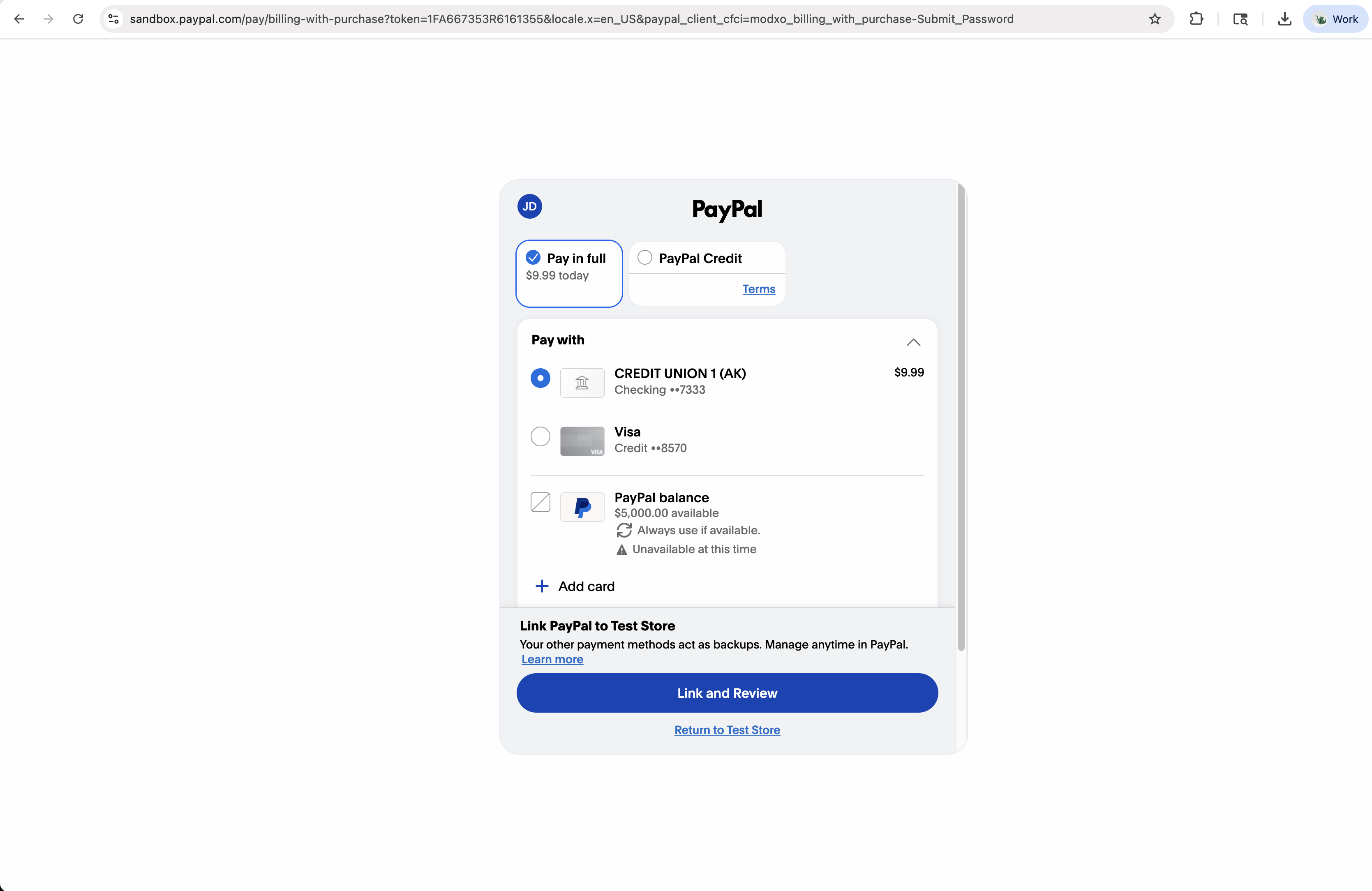
1FA667353R6161355 ($9.99/month plan).
Nothing on this page tells the buyer they're agreeing to recurring charges -
no schedule, no "monthly" label, no subscription confirmation.
That disclosure is your plugin's responsibility (see above).
- The "Pay in full" panel shows the amount as "
$9.99 today" - no "every month" suffix, no recurring indicator - The CTA button reads "
Link and Review" (not "Pay Now" or "Subscribe") because PayPal interprets this as a vault attachment + one-time charge - The "Link PayPal to Test Store" caption below the payment methods refers to the vault permission - "Manage anytime in PayPal" applies to the vault token, not a subscription
- No subscription confirmation page appears after approval - PayPal just redirects back to your
return_urlwith?token=ORDER_ID&PayerID=…
Recurring lifecycle at a glance
Three buyer-facing phases (create + approve + activate) and then a server-only loop (cron renewal → webhook → next renewal) that continues until you cancel.
┌──────────┐   ┌──────────────────┐   ┌─────────────┐   ┌────────┐
│  Plugin  │   │ Thrive PayPal    │   │ PayPal      │   │ Buyer  │
│ (merch.) │   │ Product API      │   │ Hosted UI   │   │ browser│
└────┬─────┘   └────────┬─────────┘   └──────┬──────┘   └───┬────┘
     │ 1. POST /subscriptions                │              │
     │    { intent, purchase_units, source,  │              │
     │      recurring_times,                 │              │
     │      thrive_order_id }                │              │
     ├──────────────────►│                   │              │
     │   ◄── { id, status: PAYER_ACTION_REQUIRED,           │
     │         links[rel=payer-action] }     │              │
     │                   │                   │              │
     │ 2. Redirect buyer to payer-action link               │
     ├───────────────────┼───────────────────┼─────────────►│
     │                   │  3. Buyer signs in + clicks      │
     │                   │     "Link and Review" -  vault   │
     │                   │     attaches their payment       │
     │                   │     method                       │
     │ ◄── PayPal redirects buyer back ──────┤              │
     │     ?token=ORDER_ID&PayerID=XYZ       │              │
     │                   │                   │              │
     │ 4. POST /subscriptions/{id}/activate      │              │
     ├──────────────────►│                   │              │
     │   ◄── { status: COMPLETED,            │              │
     │         payment_source.{method}.attributes.vault.id, │
     │         captures[0].id, ... }         │              │
     │                   │                   │              │
     │ ── plugin marks sub active, grants access ──         │
     │                   │                   │              │
     │ ─ ─ ─ ─ ─ ─ ─ ─ ─ time passes ─ ─ ─ ─ ─ ─ ─ ─ ─ ─    │
     │                   │                   │              │
     │                   │ 5. Cron runs, finds due sub      │
     │                   │    POST /v2/checkout/orders w/   │
     │                   │    payment_source.{m}.vault_id   │
     │                   │ ─────────────────►│              │
     │                   │   ◄── { status: COMPLETED }     │ (auto-capture; no separate call)
     │                   │                   │              │
     │                   │ 6. PayPal fires PAYMENT.CAPTURE.COMPLETED webhook
     │ ◄── re-signed forward arrives at plugin webhook      │
     │     (with x_thrive_order_id annotation)              │
     │                   │                   │              │
     │ ─ ─ ─ ─ ─ ─ ─ ─ ─ ─ ─ ─ loops monthly ─ ─ ─ ─ ─ ─ ─  │
     │                   │                   │              │
     │ 7. (eventually) POST /subscriptions/{id}/cancel          │
     ├──────────────────►│                   │              │
     │   ◄── { ok: true, vault_deleted: true }              │
Extending the PHP client
Three new methods on ThrivePaypalClient. activate and
cancel are body-less; the path carries the id.
// in class ThrivePaypalClient

/** POST /subscriptions -> { id, status: PAYER_ACTION_REQUIRED, links } */
public function createVaultSubscription( string $bearer, array $payload ): array {
    return $this->request( 'POST', '/subscriptions', [
        'Authorization' => 'Bearer ' . $bearer,
    ], [ 'data' => $payload ] );
}

/** POST /subscriptions/{id}/activate -> { status: COMPLETED, payment_source.{method}.attributes.vault.id, captures[0].id } */
public function activateVaultSubscription( string $bearer, string $id ): array {
    return $this->request( 'POST', '/subscriptions/' . rawurlencode( $id ) . '/activate', [
        'Authorization' => 'Bearer ' . $bearer,
    ] );
}

/** GET /subscriptions/{id} -> PayPal order resource + our merged 'interval' field */
public function getVaultSubscription( string $bearer, string $id ): array {
    return $this->request( 'GET', '/subscriptions/' . rawurlencode( $id ), [
        'Authorization' => 'Bearer ' . $bearer,
    ] );
}

/** POST /subscriptions/{id}/cancel -> { ok, deactivated, vault_deleted } */
public function cancelVaultSubscription( string $bearer, string $id ): array {
    return $this->request( 'POST', '/subscriptions/' . rawurlencode( $id ) . '/cancel', [
        'Authorization' => 'Bearer ' . $bearer,
    ] );
}/subscriptions
Step 1 - Create a vault order
Same shape as POST /orders with four extra fields that tell the Product API this
is a vault-recurring setup. The Product API auto-injects the
payment_source.{source}.attributes.vault.store_in_vault: ON_SUCCESS config and
records a row in paypal_subscriptions with your thrive_order_id so
renewal webhooks can be correlated back to your local record.
Required extra fields (in addition to standard order fields)
| Field | Type | Notes |
|---|---|---|
| data.source | string | Which payment source the vault attaches to. Allowlist: "paypal", "card", "venmo". Apple Pay support is recurring-only and follows a slightly different flow; see the Apple Pay section. |
| data.recurring_times | string | Renewal interval. Accepted values (fixed list, not strtotime()): daily/1 day, weekly/1 week, monthly/1 month, quarterly/3 months, semi-yearly/6 months, yearly/1 year. Anything else returns 422. |
| data.thrive_order_id | int | Your local subscription/order id. Echoed back as x_thrive_order_id on every renewal webhook so your handler can correlate without parsing custom_id. |
PHP example
// Pre-condition: your checkout page has displayed recurring terms + got consent
// before this code runs. Compliance is on you, not PayPal.

$client = new ThrivePaypalClient();
$bearer = thrive_paypal_get_bearer();

// Create your local subscription row first so you have an id to round-trip.
$local_sub_id = $wpdb->insert( 'your_subscriptions', [
    'user_id'         => get_current_user_id(),
    'plan_id'         => 42,
    'amount'          => 9.99,
    'currency'        => 'USD',
    'interval'        => '1 month',
    'status'          => 'pending',
] );

$resp = $client->createVaultSubscription( $bearer, [
    'intent' => 'CAPTURE',
    'purchase_units' => [[
        'amount'      => [ 'currency_code' => 'USD', 'value' => '9.99' ],
        'description' => 'Apprentice Pro - Monthly subscription',
    ]],
    'application_context' => [
        'return_url' => add_query_arg( 'thrive_paypal_vault_return', $local_sub_id, home_url( '/' ) ),
        'cancel_url' => add_query_arg( 'thrive_paypal_vault_cancelled', $local_sub_id, home_url( '/' ) ),
    ],
    'source'           => 'paypal',     // or 'card', 'venmo', 'apple_pay'
    'recurring_times'  => '1 month',
    'thrive_order_id'  => (int) $local_sub_id,
] );

// Save the PayPal order id; it doubles as our 'subscription_id' on subsequent calls.
$wpdb->update( 'your_subscriptions', [ 'paypal_order_id' => $resp['id'] ], [ 'id' => $local_sub_id ] );

// Redirect to the payer-action link (note the different rel than one-off orders).
foreach ( $resp['links'] as $l ) {
    if ( $l['rel'] === 'payer-action' ) { wp_redirect( $l['href'] ); exit; }
}
wp_die( 'PayPal did not return a payer-action link.' );
Response shape (minimum)
{
  "id":     "6XE605547B957144A",
  "status": "PAYER_ACTION_REQUIRED",          // NOT "CREATED" -  different from one-off orders
  "payment_source": { "paypal": [] },          // ack of the vault attribute (PayPal serialises as empty when no token yet)
  "links": [
    { "rel": "self",          "method": "GET", "href": ".../v2/checkout/orders/6XE605547B957144A" },
    { "rel": "payer-action",  "method": "GET", "href": "https://www.sandbox.paypal.com/checkoutnow?token=6XE605547B957144A" }
  ]
}status is
PAYER_ACTION_REQUIRED instead of CREATED, the buyer-facing link's
rel is payer-action instead of approve. Your code that
finds the buyer-redirect URL must check for both rels if you reuse it across one-off and
recurring flows.
IWT-required: usage_pattern for US subscription sellers
PayPal's IWT compliance requires that when a US merchant sells a
subscription, the JS SDK that loads the checkout for the vault order carries
usage_pattern=SUBSCRIPTION_PREPAID on its URL. It is scoped to US merchants
only - do not send it for non-US sellers.
Gate it on the merchant's country, which the Product API now returns as a top-level
country (ISO 3166-1 alpha-2) on both GET /merchant and
POST /onboarding/complete (persist it at connect to avoid a round-trip):
// When building the JS SDK URL for a subscription checkout:
$params = [
    'client-id'   => $partner_client_id,
    'merchant-id' => $merchant_id,
    'currency'    => $currency,
    'intent'      => 'capture',
    'vault'       => 'true',          // vault order
];

// US subscription sellers only:
if ( strtoupper( $merchant_country ) === 'US' ) {
    $params['usage_pattern'] = 'SUBSCRIPTION_PREPAID';
}

$sdk_url = 'https://www.paypal.com/sdk/js?' . http_build_query( $params );country comes from. The Product API requests the
ACCESS_MERCHANT_INFORMATION permission during onboarding, so PayPal returns the
merchant's country (plus primary_email and primary_currency) on the
merchant-integrations call. If country is ever null, treat it as "not US" for
gating purposes - it is a fail-safe, not an expected value.
PayPal hosted UI
Step 2 - Buyer approves on PayPal (what the UI looks like)
The buyer lands on PayPal's hosted checkout. As explained in the overview, this page does NOT mention recurring billing. The screenshots below are what the buyer sees for a $9.99/month vault order:
- The "$9.99 today" line does NOT say "and every month after that"
- There is NO "by clicking Pay you agree to recurring charges" disclosure on PayPal's page
- After approval, PayPal's account view will NOT show this as a "subscription" - it'll show as a one-time payment + linked account
- The buyer cannot cancel from PayPal's "Manage subscriptions" view because PayPal has no subscription record - they must come back to your site
- Your checkout page MUST present the full recurring schedule, T&Cs, and cancellation method before sending the buyer to PayPal
After the buyer clicks "Link and Review", PayPal redirects back to your
application_context.return_url with the same query shape as a one-off order:
https://merchant-site.com/?
    thrive_paypal_vault_return=42
    &token=6XE605547B957144A    // PayPal order id (use for activate)
&PayerID=A6HRLKGH4L89S // buyer's PayPal account id/subscriptions/{id}/activate
Step 3 - Activate (store vault + first charge)
v1.1 - two return shapes, and vault-first returns carry no token
For capture-first methods (Venmo/Apple Pay, non-trial card) the code below is unchanged:
PayPal redirects back with ?thrive_paypal_vault_return=<id>&token=<order_id> and
activate returns a capture body (status COMPLETED).
For vault-first methods (PayPal, and card/PayPal trials) the approval redirect comes back
without a token param - so do not gate on $_GET['token'].
Identify the order from your own thrive_paypal_vault_return marker (plus the logged-in owner),
then call activate. It returns one of two shapes:
- Trial:
{ "status": "trialing", "vaulted": true, "next_charge_at": <ts> }- no capture. Grant access now; the first charge fires atnext_charge_atas a normal renewal webhook. - Non-trial: a normal capture body (status
COMPLETED, withpurchase_units[0].payments.captures[0]) - the first period was charged immediately. Fulfil it exactly like a capture-first activation.
Same idempotency rules as the one-off Step 4 - the buyer might hit reload, the webhook for the first capture might arrive first, etc. The handler below shows the capture-first path; adapt the guard per the note above for vault-first.
add_action( 'init', function () {
    if ( ! isset( $_GET['thrive_paypal_vault_return'], $_GET['token'] ) ) return;

    $local_sub_id = (int) $_GET['thrive_paypal_vault_return'];
    $token        = sanitize_text_field( $_GET['token'] );

    $sub = $wpdb->get_row( $wpdb->prepare( 'SELECT * FROM your_subscriptions WHERE id = %d', $local_sub_id ) );
    if ( ! $sub || $sub->paypal_order_id !== $token ) wp_die( 'Unknown subscription or token mismatch.' );
    if ( $sub->status === 'active' ) { wp_redirect( $sub->thank_you_url ); exit; }   // idempotency

    $client = new ThrivePaypalClient();
    $bearer = thrive_paypal_get_bearer();
    $resp   = $client->activateVaultSubscription( $bearer, $token );

    if ( ( $resp['status'] ?? '' ) !== 'COMPLETED' ) {
        wp_die( 'Subscription activation failed (status: ' . esc_html( $resp['status'] ?? '?' ) . ').' );
    }

    $vault_id   = $resp['payment_source']['paypal']['attributes']['vault']['id']
                ?? $resp['payment_source']['card']['attributes']['vault']['id']
                ?? null;
    $capture_id = $resp['purchase_units'][0]['payments']['captures'][0]['id'] ?? null;

    $wpdb->update( 'your_subscriptions', [
        'status'           => 'active',
        'vault_id'         => $vault_id,         // Product API also stores this; this is your local copy
        'first_capture_id' => $capture_id,
        'next_renewal_at'  => date( 'Y-m-d H:i:s', strtotime( '+' . $sub->interval ) ),
        'activated_at'     => current_time( 'mysql' ),
    ], [ 'id' => $local_sub_id ] );

    do_action( 'thrive_apprentice_paypal_subscription_activated', $local_sub_id, $resp );
    wp_redirect( $sub->thank_you_url );
    exit;
} );
Response shape (real PayPal sandbox)
{
  "id":     "6XE605547B957144A",
  "status": "COMPLETED",
  "payment_source": {
    "paypal": {
      "email_address":  "sb-buyer@personal.example.com",
      "account_id":     "A6HRLKGH4L89S",
      "account_status": "VERIFIED",
      "attributes": {
        "vault": {
          "id":     "87v56082bb4667033",     // store this -  it's how renewals charge
          "status": "VAULTED",
          "customer": { "id": "OfliXFlMvM" },
          "links": [ ... ]
        }
      }
    }
  },
  "purchase_units": [{
    "payments": {
      "captures": [{
        "id":     "3T0775908G925462W",
        "status": "COMPLETED",
        "amount": { "value": "9.99", "currency_code": "USD" },
        ...
      }]
    }
  }],
  "payer": { ... }
}
Activation fails loud when no vault token comes back LIVE v1.1
For a non-trial vault subscription, the capture-first edge (Venmo / Apple Pay / card) can
return a captured payment with no vault token - meaning the buyer was
charged once but there is nothing to charge for renewals. Previously
activate returned 200 with vault_id = null in that case,
so the subscription silently never renewed and surfaced no error.
POST /subscriptions/{id}/activate returns 502
when PayPal's capture comes back without a vault token, instead of a silent
200 / vault_id:null. Treat a 502 as a failed activation:
do not grant access, do not mark the order paid / fulfilled, show the buyer a
clear error, and leave the order for reconciliation. The single charge that did go through is
reconcilable from the merchant's PayPal account. In the reusable client above, a 502
is thrown as a RuntimeException by request() (status ≥ 400),
so make sure the activation handler's catch fails closed rather than falling
through to "activate":
try {
    $resp = $client->activateVaultSubscription( $bearer, $token );
} catch ( \RuntimeException $e ) {
    // 502 = PayPal captured but returned no vault token. Fail closed:
    // no access, no fulfilment - leave the order for reconciliation.
    error_log( 'Vault activation failed (no vault token?): ' . $e->getMessage() );
    wp_die( 'We could not finish setting up your subscription. You have not been charged for a recurring plan; please contact support.' );
}
A successful activation always carries a vault token
(payment_source.{paypal|card}.attributes.vault.id); a missing one is now an error,
not a null field to defend against.
Product API only
Step 4 - Renewals (server-driven, no buyer)
You don't write code for this. The Product API's hourly cron handles renewals. On each cycle for a due subscription:
- Cron finds subscriptions where
renewal_at <= NOW()andis_active = true - For each, creates a fresh PayPal Order with
payment_source.{source}.vault_id+stored_credentialblock (MERCHANT / RECURRING / SUBSEQUENT) - PayPal auto-captures the renewal - the order comes back as
COMPLETEDimmediately, no separate capture call needed - Cron advances
renewal_atby the interval (subscriptions run until cancelled - there is no fixed cycle count) - PayPal fires
CHECKOUT.ORDER.COMPLETED+PAYMENT.CAPTURE.COMPLETEDto the Product API's webhook URL - Product API verifies PayPal's signature, then forwards the body to your plugin's
webhooks_urlsigned with yourwebhook_secret(HMAC-SHA256). The forwarded payload also carries anx_thrive_order_idannotation set to the subscription'sthrive_order_idso you can correlate the renewal back to your local row without parsingcustom_id.
Verified end-to-end on PayPal sandbox (2026-06-04)
A live $1.00 monthly subscription was created, approved by a sandbox buyer, activated, then
renewed via the cron one minute later. The renewal capture
(1UK86176JX559164B) settled COMPLETED at PayPal, the
subscription's renewal_at advanced one interval, and the
forwarded webhook arrived at the merchant receiver with the headers below:
X-Thrive-Forwarded-By: thrive-themes-api
X-Thrive-Forwarded-Merchant: HF5SN9RKCTNJ2
X-Thrive-Webhook-Signature: 9183ac049bf8dac519d753d1a4daa2c284368a3748204fcac8031eb6d5f5d143
X-Thrive-Webhook-Algorithm: HMAC-SHA256

# PayPal's original signature headers are passed through too,
# in case you want to verify against PayPal's cert as a defence-in-depth check:
Paypal-Auth-Algo: SHA256withRSA
Paypal-Cert-Url: https://api.sandbox.paypal.com/v1/notifications/certs/CERT-...
Paypal-Transmission-Id: 25c808e2-6007-11f1-966b-d329b76cb3e3
Paypal-Transmission-Sig: DvkD2hljFAjy1B4sqhjFuiOXbUGr...
Verify X-Thrive-Webhook-Signature with
hash_hmac('sha256', $raw_body, $your_webhook_secret)
before doing anything else with the event.
What your plugin needs to do
Your existing PAYMENT.CAPTURE.COMPLETED webhook handler from the Orders section
is the same handler that processes renewals. The discriminator is the
x_thrive_order_id field that the Product API adds to the forwarded payload:
// Extend your existing PAYMENT.CAPTURE.COMPLETED handler:
case 'PAYMENT.CAPTURE.COMPLETED':
    $thrive_order_id = $event['x_thrive_order_id'] ?? null;
    $capture         = $event['resource'];

    if ( $thrive_order_id ) {
        // This is a RENEWAL of an RBM subscription. Look up the local subscription row,
        // create a renewal-cycle child record, grant/extend access.
        $sub = $wpdb->get_row( $wpdb->prepare(
            'SELECT * FROM your_subscriptions WHERE id = %d', $thrive_order_id
        ) );
        if ( $sub && ! already_processed_event( $event['id'] ) ) {
            $wpdb->insert( 'your_subscription_renewals', [
                'subscription_id'  => $sub->id,
                'capture_id'       => $capture['id'],
                'amount'           => $capture['amount']['value'],
                'paid_at'          => current_time( 'mysql' ),
            ] );
            $wpdb->update( 'your_subscriptions', [
                'last_renewed_at'  => current_time( 'mysql' ),
                'next_renewal_at'  => date( 'Y-m-d H:i:s', strtotime( '+' . $sub->interval ) ),
            ], [ 'id' => $sub->id ] );

            do_action( 'thrive_apprentice_paypal_subscription_renewed', $sub->id, $capture );
            // e.g. extend course access for another month
        }
    } else {
        // Not a renewal -  it's a one-off order or a first-cycle activation
        // (handled by your existing logic from the Orders section).
        ...
    }
break;PAYMENT.CAPTURE.DENIED instead of COMPLETED. The Product API has a
D5 dunning policy: it retries the charge on Day 3 and Day 7 measured from the first failed
renewal - the schedule is anchored to that first failure, so the grace window is a fixed ~7
days regardless of when the renewal cron runs - then deactivates the subscription and fires a
final revoke webhook only if every retry fails. Your handler needs cases for both
PAYMENT.CAPTURE.DENIED (transient - do nothing, retry will come) and the
deactivation event (revoke access).
/subscriptions/{id}/cancel
Step 5 - Cancel
Cancellation MUST be initiated from your plugin's UI (the buyer can't cancel from PayPal -
PayPal has no subscription record). Your in-plugin cancellation flow calls
POST /subscriptions/{id}/cancel on the Product API, which:
- Deactivates the local
paypal_subscriptionsrow (is_active = false) - Calls PayPal's
DELETE /v3/vault/payment-tokens/{vault_id}to remove the stored payment method - Returns
{ ok: true, id: "<subscription id>", deactivated: true, vault_deleted: true|false }
// In your "Cancel subscription" form handler
$client = new ThrivePaypalClient();
$bearer = thrive_paypal_get_bearer();
$resp   = $client->cancelVaultSubscription( $bearer, $sub->paypal_order_id );

if ( $resp['ok'] ?? false ) {
    $wpdb->update( 'your_subscriptions', [
        'status'      => 'cancelled',
        'cancelled_at'=> current_time( 'mysql' ),
    ], [ 'id' => $sub->id ] );

    do_action( 'thrive_apprentice_paypal_subscription_cancelled', $sub->id, $resp );
    // e.g. set course access expiry to the end of the current paid period
}false, PayPal's vault delete
call failed (rare; usually just means the token had already expired). The subscription is
still cancelled locally - the cron won't try to renew an inactive subscription regardless.
Log the failure for audit but don't surface it to the buyer.
/cancel endpoint is
for buyer-initiated cancellation from your plugin's UI. You do not need
to call it when a payment is refunded: on a PAYMENT.CAPTURE.REFUNDED event the
Product API already deactivates the matching subscription and purges its vault token (same two
steps listed above) before forwarding the event. It resolves the subscription from either the
initial order id or a refunded renewal capture id, so dashboard refunds and renewal-charge
refunds are both covered. Your refund handler just revokes access.
Merchant disconnect = cancel at period end
When a merchant disconnects PayPal entirely (the disconnect flow in your plugin's admin), every active subscription for that merchant stops renewing immediately - the Product API deactivates them and the renewal cron skips inactive rows. Nothing else happens:
- Buyers keep access through the end of their current paid period. Your plugin's own order/access expiry enforces this - the Product API does not revoke anything on disconnect.
- No
THRIVE.ACCESS.REVOKEwebhook fires on disconnect. That event is sent exclusively when a renewal exhausts its dunning retries. Don't wait for a webhook to update subscription state after disconnect - update it in your disconnect handler. - No further charges, no wind-down period. This is the same "cancel at period end" model the Stripe gateway uses on disconnect.
/subscriptions
+ trial_days
Step 6 - Free trials (trial_days)
A free trial means no charge at signup: the buyer's payment method is vaulted,
access is granted immediately, and the first real charge fires trial_days later as
the first renewal. Because there's no purchase to attach the vault to, a trial uses PayPal's
vault-without-purchase flow (setup token → payment token) rather than the
normal vault order in Steps 1-3. You opt in by sending trial_days on
POST /subscriptions; everything downstream (renewals, dunning, cancel) is identical
to a normal vault subscription.
trial_days > 0, a
source of venmo, apple_pay, or google_pay is
rejected with 422 ({ eligible: ["paypal","card"] }). Gate your trial
UI so those methods aren't offered when a trial is active.
1 - Create with a trial
Same endpoint as Step 1, plus trial_days (integer ≥ 0; 0/omitted = no
trial). recurring_times is required (it's the post-trial billing
interval). The response is a setup token, not an order - its status is
PAYER_ACTION_REQUIRED and you redirect the buyer to the approve link
to authorize vaulting (no payment is shown).
// POST /subscriptions
{
  "data": {
    "intent": "CAPTURE",
    "purchase_units": [ { "amount": { "currency_code": "USD", "value": "29.00" } } ],  // the post-trial price
    "source": "paypal",            // or "card" - NOT venmo/apple_pay/google_pay
    "recurring_times": "1 month",  // required: billing interval after the trial
    "trial_days": 7,               // free for 7 days, then 29.00/month
    "thrive_order_id": 49050
  }
}

// Response -> a setup token (not an order):
{
  "id": "8AB12345CD678901E",                 // setup token id -> pass this to /activate
  "status": "PAYER_ACTION_REQUIRED",
  "links": [
    { "rel": "approve", "method": "GET", "href": "https://www.sandbox.paypal.com/..." }  // redirect buyer here
  ]
}
2 - Activate (no capture) - grant access on the trialing response
After the buyer returns from the approve link, call
POST /subscriptions/{id}/activate with the setup-token id. For a trial this does
not capture money - it exchanges the setup token for the vault token and
schedules the first charge. The response is a no-capture trialing shape, so
your return handler must grant access here without looking for a capture (don't call
your fulfill_from_capture_response() path):
// POST /subscriptions/8AB12345CD678901E/activate  -> trialing (no capture object):
{
  "status": "trialing",
  "vaulted": true,
  "subscription_id": "8AB12345CD678901E",
  "trial_days": 7,
  "next_charge_at": 1781999999          // unix ts: when the first real charge fires
}status. A normal (non-trial) activate returns the
captured order (status: COMPLETED + a capture). A trial activate returns
status: "trialing" with vaulted: true and no capture. Grant access on
both; mark the order trialing on the trial branch.
3 - First charge & failures
At next_charge_at the renewal cron makes the first real charge - it arrives as a
normal first-renewal PAYMENT.CAPTURE.COMPLETED webhook (annotated with
x_thrive_order_id), handled exactly like any renewal in
Step 4. A failed
first charge funnels into the same D5 dunning/grace path (Day 3 / Day 7 retries → final
THRIVE.ACCESS.REVOKE) - no special handling needed.
4 - Cancel during the trial
Cancelling before the trial ends is just the normal
Step 5 cancel:
POST /subscriptions/{id}/cancel deactivates the subscription and purges the vault
token. Since nothing was charged during the trial, no payment is taken and no refund is
needed.
Validation (422s)
| Condition | Result |
|---|---|
trial_days negative or non-integer | 422 - "trial_days must be a non-negative integer." |
trial_days > 0 with source not paypal/card | 422 - { eligible: ["paypal","card"] } |
trial_days > 0 with no recurring_times | 422 - "A free trial requires recurring_times." |
trial_days = 0 / omitted | No trial - normal vault order flow (Steps 1-3). |
Reporting: Transaction Search (partner-side only)
The FSS commitment ("Partner Transaction Search API for Connected Path") is a partner back-office capability. On the Product API it lives as a server-side artisan command that Thrive ops/finance run - not an HTTP route:
php artisan paypal:reporting:transactions --start=2026-06-01 --end=2026-06-11Partner-scoped, ~3 hour data lag, 31-day max range per query. In Phase 1 (0% partner fee) the partner ledger is essentially empty; partner fee receipts appear once split fees activate.
What the plugin should use instead
For any merchant-facing "transaction history" or support view, use the data you already
store: the order capture responses (Step 4) and the forwarded
webhooks (with their custom_id / invoice_id
correlation back to your local orders). That is the authoritative per-merchant record - the
partner Transaction Search ledger is not, and cannot be, a substitute for it.
SFTP reports (PayPal-pushed, partner-side)
Per FSS § Reporting (via SFTP), PayPal also pushes daily reports to a partner-owned SFTP endpoint. These are operational/finance artifacts (partner fee reconciliation, balance, disbursements), not consumed by the plugin - they're an Ops concern, not a WordPress concern. The plugin and Product API have no role in receiving or processing them.
In scope per FSS:
- Payouts Reconciliation (PYT) - daily, provided by default
- Marketplace Case Reconciliation (MCR) - daily, provided by default
- Attempts and Decline Report - daily (enabled for unbranded card flows)
- Balance Report (BR) - daily, for partner fees
- Disbursement Report (DR) - daily, for partner fees
Listed here so plugin developers know why the docs mention them but the API doesn't expose them - they're delivered separately from the Product API surface entirely.
Other endpoints (reference)
Endpoints not covered by the step-by-step flows above. All require Bearer auth (use the token
from Step 4 of Onboarding). Sandbox base URL:
https://tpa.stagingthrivethemes.com/api/paypal/v1.
/merchant/credentials
Fresh PayPal SDK + client tokens for the merchant, plus the merchant's
webhook_secret for HMAC verification. Call this when your cached
sdk_client_token nears expiry (it's only valid for ~15 min), or when you've lost
the webhook_secret you cached at onboarding. The client_id +
partner_merchant_id are stable and rarely change.
{
  "client_id":                   "AXCsMzCO5aAUmaBeRlm_...",  // safe to expose to browser
  "partner_merchant_id":         "HVEZ66K74VENY",
  "client_token":                "eyJicmFpbnRyZWUi...",      // nested Braintree+PayPal JWT
  "client_token_expires_in":     1321,                       // seconds remaining
  "sdk_client_token":            "eyJraWQiOiJj...",          // ES256 JWT for Advanced Card Fields
  "sdk_client_token_expires_in": 900,                        // ~15 minutes
  "webhook_secret":              "b6af2023...3fadf"           // 64-hex HMAC key (same value delivered at onboarding)
}
If sdk_client_token comes back as an empty string, the upstream PayPal token
call failed (check the paypal-debug-id response header); the rest of the
payload is still valid. For a lighter-weight refresh of just the SDK token between
checkouts, POST /auth/sdk-token returns the same
{ sdk_client_token, expires_in } pair without regenerating the rest.
/merchant
Update mutable merchant fields. Accepts license_key and
webhooks_url. Unknown fields are ignored.
// Request body:
{ "webhooks_url": "https://merchant.example/wp-json/your-plugin/paypal/webhook" }
{ "success": true }/merchant
Disconnect the merchant. Marks the row inactive on the Product API; the bearer token stops
working immediately (and POST /auth/token refuses to mint new ones). Active
vault subscriptions are deactivated in the same call - cancel at period end (D17): no
further renewal attempts, buyers keep access through their current paid period, no revoke
webhooks fire. Call this from your plugin's "Disconnect PayPal" admin button.
{ "success": true }/orders/{id}
Look up an order's current state by PayPal order id. Useful as a fallback if a return or
webhook is lost. Response mirrors PayPal's
GET /v2/checkout/orders/{id} shape: id, status,
payment_source, purchase_units (with any captures),
payer, create_time, update_time, links.
/subscriptions/{id}
Look up a vault subscription's current state. Returns the PayPal order resource with two
Thrive-added fields: interval (the renewal cadence string you supplied at
create, e.g. "monthly") and, once the subscription is activated,
vault_id (the stored payment token - lets the plugin render "saved card" UI
without storing it locally).
{
  "id":             "0U192501NM840674P",
  "status":         "COMPLETED",
  "intent":         "CAPTURE",
  "interval":       "monthly",                  // Thrive-added field
  "vault_id":       "8kk84696xy693654t",         // Thrive-added field (present once activated)
  "payment_source": { "paypal": { ... } },      // includes the vault token under attributes.vault.id
  "purchase_units": [{ "payments": { "captures": [...] } }],
  "payer":          { ... },
  "create_time":    "2026-06-04T13:00:00Z",
  "update_time":    "2026-06-04T13:01:12Z",
  "links":          [ ... ]
}/webhooks/test
Send a Thrive-signed test webhook to the merchant's webhooks_url. Useful for
smoke-testing your handler without waiting on a real PayPal event. The payload has
event_type: "WEBHOOK.TEST" and carries the same
X-Thrive-Webhook-Signature + X-Thrive-Forwarded-Merchant headers
your real handler will see.
{
  "success":       true,
  "test_id":       "TEST-D8F9C60975FF6414",     // matches the event id in the body PayPal received
  "response_code": 200                          // the HTTP code your handler returned
}/webhooks
PayPal calls this directly - no plugin code involved
PayPal's webhook destination. The Product API verifies PayPal's signature, then re-signs
and forwards every relevant event to each connected merchant's webhooks_url.
Listed here for completeness; you don't call this from the plugin. Responds
{ "received": true } back to PayPal as long as ingest succeeded (forwarding
failures are logged but don't fail the response).
PayPal-Debug-Id — the support pivot
Every response PayPal sends to the Product API carries a PayPal-Debug-Id header.
When you contact PayPal support about a failed transaction or a discrepancy, this is the
first thing they ask for. Without it they can't find the call in their logs; with it the
conversation is one query away from resolution.
- Response header:
PayPal-Debug-Idon every successful response (orders, captures, refunds, subscriptions, merchant). Read it fromwp_remote_retrieve_header( $resp, 'paypal-debug-id' ). - Server logs: every PayPal call logs a line with
paypal_debug_idas a structured field for support to grep on.
What to store on each local order
Capture the debug id alongside the order id on every transaction-affecting call - create, capture, refund, and renewals. PayPal's debug id is one-per-API-call, not one-per-buyer-or-order, so retain the most recent one for whichever call most recently touched the local order.
// After every PayPal-touching call:
$resp     = $client->captureOrder( $bearer, $orderId );
$debugId  = wp_remote_retrieve_header( $client->lastResponse, 'paypal-debug-id' );

update_post_meta( $local_order_id, '_thrive_paypal_debug_id', $debugId );
update_post_meta( $local_order_id, '_thrive_paypal_debug_id_capture_time', current_time( 'mysql' ) );

// In your admin order view, display it so support reps can copy + paste:
echo '<p>PayPal Debug ID: <code>' . esc_html( get_post_meta( $local_order_id, '_thrive_paypal_debug_id', true ) ) . '</code></p>';
When errors come back
On 503 upstream errors we still surface the debug id in our error log line (not
the response body, to avoid leaking PayPal internals). The Laravel log entry includes
paypal_debug_id as a structured field on every failure, so grep
storage/logs/laravel.log by the merchant's order id or capture id and the
debug id is right there.
Webhook event catalog
The Product API POSTs HMAC-signed events to your webhooks_url. Every event in
this catalog arrives via the same delivery path (same headers, same HMAC-SHA256 signature
over the body using your webhook_secret), but events come from two sources:
- Forwarded (PayPal-originated): PayPal sends the event to the Product API, we
verify PayPal's signature, then re-sign with your
webhook_secretand forward. Body is PayPal's payload with one Thrive-added field at the top level:x_thrive_order_id(when the event correlates to a row in ourpaypal_subscriptionstable). Identifiable by the event prefixPAYMENT.*/CHECKOUT.*(PayPal's namespacing). - Synthetic (Thrive-originated): The Product API mints the event itself when
internal state needs to be communicated to the plugin (e.g. dunning exhaustion). Same HMAC
signature path. Identifiable by the event prefix
THRIVE.*.
Plugin must implement a handler for at minimum PAYMENT.CAPTURE.COMPLETED, PAYMENT.CAPTURE.REFUNDED, PAYMENT.CAPTURE.DENIED, and THRIVE.ACCESS.REVOKE. Unknown event types should be no-oped with a 200 response (returning 5xx will cause infinite retries from PayPal for forwarded events).
| event_type | Source | When it fires | Critical fields | Plugin handler action |
|---|---|---|---|---|
| PAYMENT.CAPTURE.COMPLETED | PayPal (forwarded) | Capture settles (one-off order OR vault renewal). Most important event in the system. | resource.id, resource.amount, resource.seller_receivable_breakdown.net_amount, x_thrive_order_id (for renewals only) |
Grant access. If x_thrive_order_id present → it's a renewal, write a renewal-cycle row. Otherwise it's a first-time capture. |
| PAYMENT.CAPTURE.DENIED | PayPal (forwarded) | Capture failed (declined card, insufficient PayPal balance, etc.). Common for renewal attempts on expired card vaults. | resource.id, x_thrive_order_id for renewals |
If x_thrive_order_id set → do nothing; Product API D5 dunning will retry on Day 3 / Day 7. Plugin only acts on the final revoke event. |
| PAYMENT.CAPTURE.PENDING NEW v1.1 | PayPal (forwarded) | Capture is settling asynchronously (delayed settlement) - common for APMs (bank-redirect flows like iDEAL, EPS) and any payment held for manual review. Funds haven't moved yet but PayPal acknowledges the order is in progress. Newly added to the forwarded set in v1.1 (see note below). | resource.id, resource.status_details.reason |
Do NOT grant access yet. Wait for PAYMENT.CAPTURE.COMPLETED (or DENIED) which fires when the async settlement resolves. If your local order is in a "pending" state, this is the signal to confirm to the buyer that the order is in flight. |
| PAYMENT.CAPTURE.REFUNDED | PayPal (forwarded) | A previously-captured payment has been refunded (full or partial). | resource.id (refund id), resource.amount, resource.links[].rel="up" (linkback to capture) |
Revoke access for the original order. Per Apprentice convention any refund maps to whole-order revoke, matching Stripe/Square behaviour. For vault subscriptions you do NOT need to call /subscriptions/{id}/cancel: when this event correlates to a subscription (initial order or a renewal capture), the Product API has already deactivated that subscription and purged its vault token before forwarding - so renewals stop server-side. Your handler only revokes access. |
| CHECKOUT.ORDER.APPROVED NEW v1.1 | PayPal (forwarded) | Buyer approved the order at PayPal's hosted page (clicked Pay). The order is authorised but not yet captured - capture is your POST /orders/{id}/capture call. PayPal fires this before the buyer returns to your site. Newly added to the forwarded set in v1.1 (see note below). |
resource.id, resource.payer, resource.purchase_units |
Usually a no-op for the plugin - your return-flow capture handler already drives next steps. Some plugins use this as a "buyer is committed" signal to send a "we're processing your order" email; safe to ignore otherwise. |
| CHECKOUT.ORDER.COMPLETED | PayPal (forwarded) | Order moves to COMPLETED at PayPal. Fires alongside PAYMENT.CAPTURE.COMPLETED for auto-capture orders. |
resource.id, resource.purchase_units[0].payments.captures[] |
Usually a duplicate signal to PAYMENT.CAPTURE.COMPLETED. Safe to ignore if your handler dedupes by event id, but write the handler so reordered arrival doesn't break. |
| PAYMENT.SALE.COMPLETED | PayPal (forwarded) | Legacy event - PayPal still fires this for some flows. | resource.id |
Treat as alias for PAYMENT.CAPTURE.COMPLETED. Most new integrations can no-op this. |
| THRIVE.ACCESS.REVOKE | Thrive (synthetic) | Fires when the renewal cron's D5 dunning exhausts (Day 7 retry also fails). Product API deactivates the subscription on its side and sends this so the plugin can revoke buyer access. | resource.subscription_id, resource.reason, resource.last_error, x_thrive_order_id |
Revoke course access for the subscription's local order. End-state event - no further retries are coming. |
| WEBHOOK.TEST | Thrive (synthetic) | Plugin called POST /api/paypal/v1/webhooks/test to smoke-test their handler. |
resource.id (test id), resource_type |
Optional - usually only used during admin smoke tests. Safe to no-op in production handler. |
THRIVE.*
events to bridge the gap. The plugin's HMAC verification is identical for both event
sources; only the event_type string differs.
PAYMENT.CAPTURE.PENDING (delayed settlement) and
CHECKOUT.ORDER.APPROVED (fires before capture). Your handler should already cope
with them - both follow the catalog above (do not grant access on
PENDING; wait for PAYMENT.CAPTURE.COMPLETED; safe to ignore
CHECKOUT.ORDER.APPROVED) and the unknown-event default already no-ops cleanly.
The partner webhook subscription has now been re-registered with PayPal to add these two types,
so both are registered and delivered (live on staging as of 2026-06-17). The vestigial
BILLING.SUBSCRIPTION.* events were dropped from the registration at the same time -
they never fired (recurring billing uses RBM vault charges, not PayPal Subscriptions), so do not
expect them.
Handler skeleton (PHP)
// REST endpoint registered at $webhooks_url, e.g. /wp-json/your-plugin/paypal/webhook
function paypal_webhook_handler( WP_REST_Request $req ) {
    $raw_body  = $req->get_body();
    $signature = $req->get_header( 'x-thrive-webhook-signature' );
    $merchant  = $req->get_header( 'x-thrive-forwarded-merchant' );

    // 1. Verify HMAC FIRST. Never trust the body until signature checks out.
    $secret   = get_option( 'thrive_paypal_webhook_secret' );
    $expected = hash_hmac( 'sha256', $raw_body, $secret );
    if ( ! hash_equals( $expected, (string) $signature ) ) {
        return new WP_REST_Response( [ 'error' => 'invalid signature' ], 401 );
    }

    $event = json_decode( $raw_body, true );

    // 2. Idempotency: dedupe by PayPal's event id. PayPal CAN retry on 5xx, and
    //    the Product API forwards every retry through to us.
    $event_id = $event['id'] ?? '';
    if ( already_processed_event( $event_id ) ) {
        return new WP_REST_Response( [ 'received' => true, 'dedup' => true ], 200 );
    }
    mark_event_processed( $event_id );

    // 3. Dispatch on event_type
    switch ( $event['event_type'] ?? '' ) {
        case 'PAYMENT.CAPTURE.COMPLETED':
            handle_capture_completed( $event );
            break;
        case 'PAYMENT.CAPTURE.DENIED':
            handle_capture_denied( $event );
            break;
        case 'PAYMENT.CAPTURE.REFUNDED':
            handle_capture_refunded( $event );
            break;
        case 'THRIVE.ACCESS.REVOKE':
            handle_access_revoke( $event );
            break;
        case 'CHECKOUT.ORDER.COMPLETED':
        case 'PAYMENT.SALE.COMPLETED':
            // Usually duplicates of capture-completed; safe to ignore.
            break;
        default:
            // Unknown event - log + 200. Returning 5xx makes PayPal retry forever.
            error_log( 'Unhandled paypal event: ' . ( $event['event_type'] ?? '?' ) );
    }

    return new WP_REST_Response( [ 'received' => true ], 200 );
}What resource.last_error looks like on THRIVE.ACCESS.REVOKE
The last_error field carries the underlying PayPal failure that exhausted the dunning budget,
in the format "PayPal call orders_create failed: HTTP <status>". Live-verified examples
from sandbox (June 2026):
HTTP 403- invalid / revoked vault token. PayPal refuses to charge against a vault token that no longer exists or doesn't belong to the merchant. This is the typical outcome when a buyer revokes the saved payment method on their PayPal account.HTTP 422- declined card / insufficient funds / generic processing rejection (PayPal's catch-all for buyer-side payment failures).HTTP 4xxgenerally - any client-side failure consumed the budget. The renewal cron makes 2 retries (Day 3, Day 7) before firing THRIVE.ACCESS.REVOKE.
HTTP 5xx codes will NOT appear in last_error of a REVOKE event - PayPal infrastructure errors
trigger a 1-hour retry path that does not consume the dunning budget, so a sub can't be revoked due to PayPal-side outages.
Plugins typically don't need to branch on last_error - the recommended handler just revokes course access
regardless of cause. The field is exposed so you can surface a useful diagnostic in admin / customer-facing dunning emails
(e.g. "your saved payment method is no longer valid" for 403, "your card was declined" for 422).
Simulating webhooks (for QA)
To test your webhook handler without waiting for - or triggering - a real PayPal event,
Thrive can deliver a simulated event to your configured webhooks_url.
This is especially useful for THRIVE.ACCESS.REVOKE, which otherwise only fires
after a full multi-day dunning cycle, and for exercising a PAYMENT.CAPTURE.COMPLETED
with a specific amount or order id.
What gets delivered
A simulated event is byte-faithful to a real forwarded webhook: PayPal-origin
events (PAYMENT.CAPTURE.*, CHECKOUT.ORDER.*) use the latest real
event of that type as the base (never a hand-built payload), and the synthetic
THRIVE.ACCESS.REVOKE is built from the same code the renewal cron uses in production.
It's delivered through the identical HMAC-signed path, so your existing
X-Thrive-Webhook-Signature verification works unchanged.
The one difference from a genuine event: simulated deliveries carry an extra header so you can tell them apart if you want to (e.g. to avoid side effects in a test environment):
X-Thrive-Webhook-Simulated: true
Treat it exactly like a real event for handler logic; the header is purely informational.
It still has a valid signature and (for subscription events) the x_thrive_order_id
annotation, resolved the same way as production.
How Thrive fires one (for reference)
# inspect the real shape of an event type first
php artisan paypal:webhooks:events --type=PAYMENT.CAPTURE.COMPLETED --raw

# deliver a simulated event to a merchant, overriding any field as needed
php artisan paypal:webhooks:simulate --event=PAYMENT.CAPTURE.COMPLETED --merchant=<MERCHANT_ID> \
    --set resource.amount.value=15.00 --set x_thrive_order_id=1234

# the dunning revoke event, on demand (no 7-day wait)
php artisan paypal:webhooks:simulate --event=THRIVE.ACCESS.REVOKE --merchant=<MERCHANT_ID> --subscription-id=<SUB>
When you want a specific scenario tested against your staging handler, tell us the event type and any field values you need (amount, order id, etc.) and we'll fire it.
Claude Code skill (Thrive-side)
If you operate the Product API (Thrive ops / QA), this is the Claude Code skill that drives the
two commands above - drop it in your repo at .claude/skills/paypal-webhook-sim/SKILL.md.
It's for whoever runs the server-side commands, not the plugin runtime. Copy it below, or
download SKILL.md.
---
name: paypal-webhook-sim
description: Inspect a real PayPal webhook event shape and construct/run a paypal:webhooks:simulate call to deliver a simulated event to a merchant for QA
---

# PayPal Webhook Simulator

Use this when someone wants to test a merchant's webhook handler (plugin side)
without waiting for, or triggering, a real PayPal event - e.g. testing the
`THRIVE.ACCESS.REVOKE` access-revoke flow without a 7-day dunning cycle, or
firing a `PAYMENT.CAPTURE.COMPLETED` with a specific amount/order id.

Two artisan commands back this (in the Product API, `thrive-themes-api`):
- `paypal:webhooks:events` - inspect/capture the **real** events PayPal has fired (the source of truth for payload shapes).
- `paypal:webhooks:simulate` - deliver a simulated event to a merchant, using a real event as the base, forwarded through the production HMAC-signed path.

These run on the server (staging: `tpa@142.93.234.253`, in `/sites/tpa.stagingthrivethemes.com/files`). Prefix with `ssh tpa@142.93.234.253 "cd .../files && <artisan cmd>"`.

## Workflow

1. **Confirm the inputs.** You need the `--event` type and the target `--merchant` (a `merchant_id` with a `webhooks_url` configured). If the user hasn't given both, ask.

2. **Inspect the real shape first** (so any `--set` overrides target real keys, not guessed ones):
   ```
   php artisan paypal:webhooks:events --type=<EVENT> --raw
   ```
   Read the `resource` block. Note the dot-paths the user might want to override (e.g. `resource.amount.value`, `resource.id`, `resource.supplementary_data.related_ids.order_id`).
   - For `THRIVE.ACCESS.REVOKE` there is no real PayPal event (it's synthetic) - skip the inspect; the command builds it from the production `buildRevokePayload()`. Its shape: `resource.subscription_id`, `resource.merchant_id`, `resource.reason`, `resource.last_error`, and top-level `x_thrive_order_id`.

3. **Construct and run the simulate call.** Base form:
   ```
   php artisan paypal:webhooks:simulate --event=<EVENT> --merchant=<MERCHANT_ID>
   ```
   Add overrides as needed (applied last, so they win over the base + annotation):
   - `--set dot.path=value` - string/auto-coerced (numbers→int, `true`/`false`/`null` coerced). PayPal amounts stay strings, so `--set resource.amount.value=15.00` is correct.
   - `--set-json dot.path=<json>` - for nested/typed values.
   - `--subscription-id=<id>` - seed the annotation / revoke payload from a real local subscription.
   Example (test a $15 renewal capture tied to a known order):
   ```
   php artisan paypal:webhooks:simulate --event=PAYMENT.CAPTURE.COMPLETED --merchant=HF5SN9RKCTNJ2 \
       --set resource.amount.value=15.00 --set x_thrive_order_id=1234
   ```

4. **Report the result.** The command prints the merchant's HTTP response code. 2xx = handler accepted it (exit 0); non-2xx = handler error (exit 1). Relay that.

## Guardrails

- **Simulate POSTs a real (signed) request to the merchant's live `webhooks_url`.** For `THRIVE.ACCESS.REVOKE` especially, this will actually revoke access on that site. Only target test/QA merchants unless the user explicitly intends a real merchant. Confirm before firing a revoke at a non-obvious merchant.
- If `paypal:webhooks:simulate` errors with "No real <EVENT> event found", that event type hasn't been fired to us yet - trigger one in sandbox once (e.g. a declined renewal for `PAYMENT.CAPTURE.DENIED`), then it's available.
- The merchant must have a `webhooks_url`; the command fails fast if not.

## Notes
- Payloads are never hand-rolled: PayPal-origin events use the latest real event of that type; the synthetic revoke reuses the cron's production builder. This keeps simulated events byte-faithful to what the plugin receives in production.
- Simulated deliveries carry an `X-Thrive-Webhook-Simulated: true` header so the receiver can distinguish them.
HMAC verification recipe
Every forwarded webhook carries an X-Thrive-Webhook-Signature header. Verify
it against the raw request body using the webhook_secret you cached at
onboarding. Without this verification, any attacker who guesses your webhooks_url
could fake events.
Algorithm
- Read the request body as raw bytes (NOT a parsed array; the signature is over the exact bytes PayPal sent).
- Compute
hash_hmac('sha256', $raw_body, $webhook_secret)- 64-hex output. - Compare with
X-Thrive-Webhook-Signatureusing a constant-time compare (hash_equals). - If they match, the event is authentic. Process it. If not, return 401 and log.
Reference PHP implementation
function thrive_paypal_verify_webhook_signature( WP_REST_Request $request ): bool {
    $raw_body  = $request->get_body();                              // raw bytes - critical
    $signature = (string) $request->get_header( 'x-thrive-webhook-signature' );
    $algorithm = (string) $request->get_header( 'x-thrive-webhook-algorithm' );

    if ( $algorithm !== 'HMAC-SHA256' ) {
        error_log( 'Unsupported webhook signature algorithm: ' . $algorithm );
        return false;
    }

    $secret = get_option( 'thrive_paypal_webhook_secret' );
    if ( empty( $secret ) ) {
        error_log( 'Cannot verify webhook: webhook_secret missing. Refresh via GET /merchant/credentials.' );
        return false;
    }

    $expected = hash_hmac( 'sha256', $raw_body, $secret );

    // hash_equals is constant-time - resistant to timing attacks
    return hash_equals( $expected, $signature );
}
Common pitfalls
- Re-encoding the body - if you
json_decode + json_encodebefore signing, the byte sequence changes (key order, whitespace, escaping). Always sign the original raw body. - Using
===instead ofhash_equals- vulnerable to timing attacks. Use the constant-time compare even though the inputs are 64 hex chars. - Lost secret - if the merchant clears their WordPress options, re-fetch via
GET /merchant/credentials(Bearer auth) and re-cache. Don't try to derive it. - HTTP header casing -
$_SERVER['HTTP_X_THRIVE_WEBHOOK_SIGNATURE']and$request->get_header('x-thrive-webhook-signature')are equivalent; pick whichever your framework prefers.
Paypal-Transmission-Id,
Paypal-Transmission-Sig, Paypal-Cert-Url, etc.). You can
independently verify against PayPal's cert if you want belt + suspenders, but the
HMAC verification above is the primary mechanism and is sufficient for IWT.
Sandbox quirks & gotchas
Surprises we hit during live sandbox testing that the public PayPal docs don't call out. Document this list in your plugin's developer notes so future engineers don't rediscover them.
| Surface | Symptom | Cause / fix |
|---|---|---|
| payment_source.p24.name | PayPal returns INVALID_PARAMETER_VALUE on the name field |
P24 rejects digits in the name. "P24 Tester" fails; "Jan Kowalski" works. Validate alpha-only on the plugin's checkout form for P24. |
| payment_source.trustly | ORDER_COMPLETE_ON_PAYMENT_APPROVAL error on order create |
Trustly requires top-level processing_instruction: "ORDER_COMPLETE_ON_PAYMENT_APPROVAL". PayPal then auto-completes the order on buyer approval - no separate /capture call needed (the order will already be COMPLETED on return). |
| APM /capture HTTP timeout | Capture call drops at 30s; you assume the payment failed but it actually succeeded | APMs involve bank-side settlement; capture can take longer than the HTTP timeout. The Product API auto-recovers by re-fetching the order. Plugin should similarly treat connection timeouts as "indeterminate, recheck" rather than "failed". |
| application_context + experience_context | INCOMPATIBLE_PARAMETER_VALUE on order create |
PayPal forbids setting return_url/cancel_url in both application_context AND payment_source.{method}.experience_context. Pick one. Product API detects this and skips its auto-fill if the plugin set experience_context first. |
| EPS / Bancontact / iDEAL sandbox | Buyer-side flow doesn't ask for PayPal credentials | These APMs in sandbox skip PayPal personal-account login entirely and go straight to a simulated bank flow. The PayerID query param will be absent on the return URL. Don't make your return handler require PayerID. |
| Recurring (vault) on PayPal hosted page | PayPal's hosted checkout shows the amount with no recurring messaging | Because Thrive uses vault-based RBM (not PayPal's Subscriptions API), PayPal's hosted page has no concept of "subscription" at buyer-approval time. The CTA reads "Link and Review". Your plugin's checkout MUST present the recurring schedule + cancellation policy + explicit consent BEFORE the redirect. |
| Apple Pay - merchant side | Partner /wallet-domains 500s clear after re-onboarding the merchant; dashboard UI registration also works |
PayPal's sandbox /v1/customer/wallet-domains can get into a state where every call returns HTTP 500 INTERNAL_SERVER_ERROR despite APPLE_PAY: ACTIVE. Re-running the partner referral flow against the same merchant clears it - see the Apple Pay troubleshooting section. Manual UI registration via Settings → Apple Pay also works if re-onboarding isn't available. |
| Apple Pay - buyer side | Apple Pay sheet silently cancels when authorising with a real card | Apple's payment session refuses to authorise real cards against sandbox merchants (preventing accidental real charges). For end-to-end buyer-side sandbox testing you need: an Apple Developer Program enrollment ($99/yr) → create a Sandbox Tester Apple ID via App Store Connect → sign into Settings → App Store → Sandbox Account on iOS → add a sandbox card from developer.apple.com/apple-pay/sandbox-testing/ to Wallet. Most partners skip this and validate the final-card-authorise step in production with a real Apple ID + real card against staging - the integration code path is identical. |
| Venmo vault subscriptions | Buyer-side flow returns "Something went wrong"; order creation succeeds but vault attribute is not honoured | Per PayPal's own multiparty docs (save-during-purchase/js-sdk/venmo/): "Venmo is not fully supported in the sandbox environment" and "Venmo is not available in the sandbox environment". Order create with payment_source.venmo.attributes.vault.store_in_vault: ON_SUCCESS is accepted; the Venmo web flow then can't complete because venmoVaultEnabled=false in the resulting redirect URL. One-time Venmo (no vault) works fine in sandbox via the documented pwvtest@gmail.com identity. Vault flow only fully verifiable in production. |
| Webhook delivery delay | Webhook lands seconds before or after the buyer return | PayPal's webhook delivery is best-effort and async. Either order is possible: webhook before redirect-back, or webhook after capture completes. Your return handler and webhook handler must both be idempotent (dedupe by event id + order state) so reordered arrival doesn't double-process. |
Error responses
Standard Product API error envelope:
{
  "error":  "Human-readable summary",
  "status": 4xx | 5xx,
  "errors": ["Optional list of specific issues"]  // custom checks (e.g. APM payload validation)
}
Framework-level validation failures (missing data on order create, bad
domain, etc.) use Laravel's standard shape instead:
{ "message": "…", "errors": { "field": ["msg", …] } } - an object keyed by
field name, no top-level error key. Handle both shapes on 422.
HTTP status codes
| Status | Meaning | What to do |
|---|---|---|
| 200 | Success | Process the body. |
| 201 | Resource created | Process the body; persist any returned id. |
| 401 | Bearer token missing, invalid, or expired | Re-mint via POST /auth/token using Basic (merchant_id:secret). Retry the original call. |
| 404 | Resource not found (order id, subscription id, domain not registered) | Check your stored id. Don't auto-retry. |
| 422 | Validation failure (missing/bad field) OR APM payment_source rejected on /subscriptions OR plan-level rule violation | Inspect errors[] array. Fix the payload; don't retry as-is. |
| 500 | Internal error in the Product API | Log + alert. Don't auto-retry without backoff. Contact Thrive support if recurring. |
| 503 | Upstream PayPal error - either PayPal rejected our call (422/500 on their side) OR the HTTP call timed out | If the call was a capture/refund: recheck order/refund status before assuming failure (PayPal may have succeeded async). Otherwise treat as transient; retry once with backoff, then surface to admin. |
PayPal error codes worth handling specifically
When the Product API returns 503, the underlying PayPal error name is logged on the Product API server side. Common ones the plugin team should know about (so support can diagnose merchant tickets):
| PayPal error name | Likely cause |
|---|---|
| INVALID_RESOURCE_ID | Wrong order/capture id, or the merchant onboarded in a different env than what we're calling. |
| INVALID_PARAMETER_VALUE | Specific field rejected. Check the details[].field on the PayPal response. P24's no-digits-in-name lives here. |
| INCOMPATIBLE_PARAMETER_VALUE | Conflicting fields (the application_context vs experience_context return_url case). |
| MALFORMED_REQUEST_JSON | Body type mismatch (object where string expected, etc.). |
| ORDER_COMPLETE_ON_PAYMENT_APPROVAL | Trustly-specific - top-level processing_instruction is required. |
| ORDER_ALREADY_CAPTURED | Idempotency mis-handle. Your capture call ran twice (PayPal completed the first; your retry hit this). Treat as success; the capture id from the first attempt is the canonical one. |
| PAYER_ACTION_REQUIRED | You tried to capture an order before the buyer approved. Check order status before calling capture. |
| UNPROCESSABLE_ENTITY | Generic 422. Check the details[] array on PayPal's response. |
What to store on the merchant's site
| Field | WordPress option name | Sensitivity | Notes |
|---|---|---|---|
| merchant_id | thrive_paypal_merchant_id | Low | Identifies the merchant; non-secret |
| secret | thrive_paypal_secret | High | Encrypt at rest. Basic-auth password for token issuance. |
| access_token | transient: thrive_paypal_bearer | High | 7-day TTL. Store as a transient so it expires cleanly. |
| client_id | thrive_paypal_client_id | Low | For PayPal JS SDK init on checkout. Safe to expose to browser. |
| sdk_client_token | thrive_paypal_sdk_token | Medium | Short-lived (~15 min); refresh via /merchant/credentials or POST /auth/sdk-token. |
| webhook_secret | thrive_paypal_webhook_secret | High | Encrypt at rest. HMAC-SHA256 key for verifying X-Thrive-Webhook-Signature on every forwarded webhook. Delivered at /onboarding/complete; refreshable via /merchant/credentials. |
Anything else (vault tokens, subscription state, partner credentials) lives on the Product API. Don't try to cache PayPal merchant capabilities aggressively - they can change when PayPal vets a new capability.
Error handling
| Status | What happened | What to do |
|---|---|---|
| 401 | Bearer missing/expired, or unknown merchant on Basic auth | Re-issue Bearer via /auth/token. If still 401, restart from Step 1. |
| 422 | Validation error | Body has the field-level errors. Show them to the admin user. |
| 503 | Upstream PayPal error | Retry once after a short delay. If persistent, surface and log. |
| 500 | Internal Product API error | Log + report. Do not retry blindly. |
Standard error envelope:
{
  "error":  "Upstream PayPal error",
  "status": 503
}
The original PayPal error JSON is not echoed in the response (to avoid leaking
PayPal internals). It lives in the Product API's server logs - correlate via the
paypal-debug-id response header when raising an issue.
Re-onboarding a merchant
Merchants sometimes need to disconnect and reconnect - different PayPal account, new business entity, debugging. The flow is the same: call partner-referral again, walk them through PayPal, exchange credentials. The Product API handles the transition cleanly:
- If you reuse the same
secretbut a differentmerchant_id, the old customer record is deactivated and a new one is created. - If you'd previously disconnected and the same
(merchant_id, site_url)reappears, the old record reactivates with the new secret. - Old Bearer tokens become invalid - call
/auth/tokenagain to get a fresh one.
Tip: use the DELETE /merchant endpoint (Bearer auth) when the
merchant intentionally severs the connection. That cleans up server-side state before they reconnect.
Testing your integration
- Set
THRIVE_PAYPAL_API_BASEtohttps://tpa.stagingthrivethemes.com/api/paypal/v1. - From your plugin admin, trigger the "Connect PayPal" action. Verify Steps 1-4 fire and the bearer is cached.
- Sign in to PayPal sandbox with a Business test account when prompted (PayPal Developer Dashboard → Sandbox → Accounts → reveal the system-generated password). Approve the partner permissions.
- Confirm the redirect lands at your
site_urlwithpermissionsGranted=true+consentStatus=truein the query string. - Hit
GET /merchantvia your client and confirm the response shape matches the Product API's contract (capabilities list,payments_receivable). - Try a non-auth call (e.g., omit the
Authorizationheader) to verify your error-handling path renders a useful message. - Try a deliberately wrong
secreton Step 4 - expect 401. Confirm you re-prompt the admin to reconnect. - Once Steps 1-4 are stable, integrate
/orders+/orders/{id}/capturefor one-time payments and/subscriptions/*for vault subscriptions.
- Admin test harness - drive the API by clicks without writing plugin code.
- Interactive API reference - Try-It panels for every onboarding endpoint.
tail -f wp-content/debug.log- whenTHRIVE_PAYPAL_DEBUG=true, every request + response is logged.
Migrating from wp-payment-pal-paypal-service
Some Awesome Motive plugins were prototyped against
wp-payment-pal-paypal-service (a.k.a. wpsp) - the WP Simple Pay PayPal middleware whose
contract we ported. If your code is already calling those endpoints, the URLs below tell you what to change.
The request bodies and response shapes are compatible unless noted; only the path and - in a few cases - the
HTTP method differ.
/processor/"
was a leftover namespace marker). The Thrive paths describe what the consumer is doing - starting onboarding,
managing their merchant record, creating an order - which is what an integrator actually cares about.
| Purpose | wpsp (before) | Thrive (now) | Notes |
|---|---|---|---|
| Onboarding | |||
| Start onboarding | POST /oauth/partner-referral | POST /onboarding/start | Same body. Same response. |
| Complete onboarding | POST /oauth/credentials | POST /onboarding/complete | Same body. Response also includes sdk_client_token. |
| Auth tokens | |||
| Issue Bearer (Basic → Bearer) | POST /oauth/access-token | POST /auth/token | Same Basic-auth header. Same response. |
| Refresh PayPal client token | POST /oauth/client-token | POST /auth/client-token | Same response. |
| SDK client token (Apple Pay etc.) | POST /oauth/sdk-client-token | POST /auth/sdk-token | Same response. |
| Merchant (was "customers") | |||
| Get capabilities + status | GET /customers/merchant-info | GET /merchant | Same response. |
| Get client credentials | GET /customers/credentials | GET /merchant/credentials | Same response. |
| Update license / webhook URL | POST /customers/update | PATCH /merchant | Method changed (POST → PATCH). Same body. |
| Disconnect | POST /customers/disconnect | DELETE /merchant | Method changed (POST → DELETE). No body. |
| Orders (resource id in URL) | |||
| Create order | POST /orders/create | POST /orders | Same body. Same response. |
| Get order | GET /orders/get?id=… | GET /orders/{id} | Id moved from query string to URL path. |
| Capture order | POST /orders/capture body: { id } |
POST /orders/{id}/capture no body |
Id moved to URL path; { id } body dropped. |
| Refund capture | POST /orders/refund body: { id, amount?, currency? } |
POST /captures/{id}/refund body: { note_to_payer? } - full refunds only; amount/currency → 422 |
Operates on capture_id, not order_id - routed under /captures to make that explicit. Id moved to URL. |
| Vault subscriptions ("/processor" dropped) | |||
| Create subscription | POST /subscriptions/processor/create | POST /subscriptions | Same body. Same response. |
| Activate (capture first payment + vault) | POST /subscriptions/processor/capture body: { id } |
POST /subscriptions/{id}/activate no body |
Renamed for what it actually does (activate, not "capture"). Id moved to URL. |
| Get subscription | GET /subscriptions/processor/get?id=… | GET /subscriptions/{id} | Id moved from query string to URL path. |
| Cancel subscription | POST /subscriptions/processor/cancel body: { id } |
POST /subscriptions/{id}/cancel no body |
Id moved to URL. |
| Webhooks | |||
| PayPal → Product API ingress | POST /webhooks | POST /webhooks | Unchanged (PayPal already points here in both worlds). |
| Plugin-triggered test webhook | POST /webhooks/test | POST /webhooks/test | Unchanged. |
A minimal find-and-replace script
If you have a small plugin codebase, this sed sequence handles 90% of the mechanical changes.
The method changes (PATCH on update, DELETE on disconnect) and the id-in-URL changes still need eyes on
them - most HTTP clients require a separate code change for the verb.
sed -i '' \
  -e 's|/oauth/partner-referral|/onboarding/start|g' \
  -e 's|/oauth/credentials|/onboarding/complete|g' \
  -e 's|/oauth/access-token|/auth/token|g' \
  -e 's|/oauth/client-token|/auth/client-token|g' \
  -e 's|/oauth/sdk-client-token|/auth/sdk-token|g' \
  -e 's|/customers/merchant-info|/merchant|g' \
  -e 's|/customers/credentials|/merchant/credentials|g' \
  -e 's|/subscriptions/processor/create|/subscriptions|g' \
  -e 's|/orders/create|/orders|g' \
  $(grep -rl '/oauth/\|/customers/\|/subscriptions/processor\|/orders/create' src/)
After running the script, audit the remaining call sites:
customers/update- change method to PATCH, path to/merchant, keep body.customers/disconnect- change method to DELETE, path to/merchant, drop body.orders/capture+orders/refund+ everysubscriptions/processor/*mutation - move theidfrom the request body into the URL.orders/get+subscriptions/processor/get- drop the?id=…query string, put the id in the path.